Drop in a magnetic, gravity, radiometric or elevation grid, as a GeoTIFF, ER Mapper or Geosoft file. Stretch it, recolour it and move the sun across it until the structure shows, then trace your interpretation over it and take that back to your GIS. Nothing to install, and your files never leave your computer.
Free to use. Or drop a grid anywhere on this page: it opens in Lightbox, read by your browser, never uploaded.
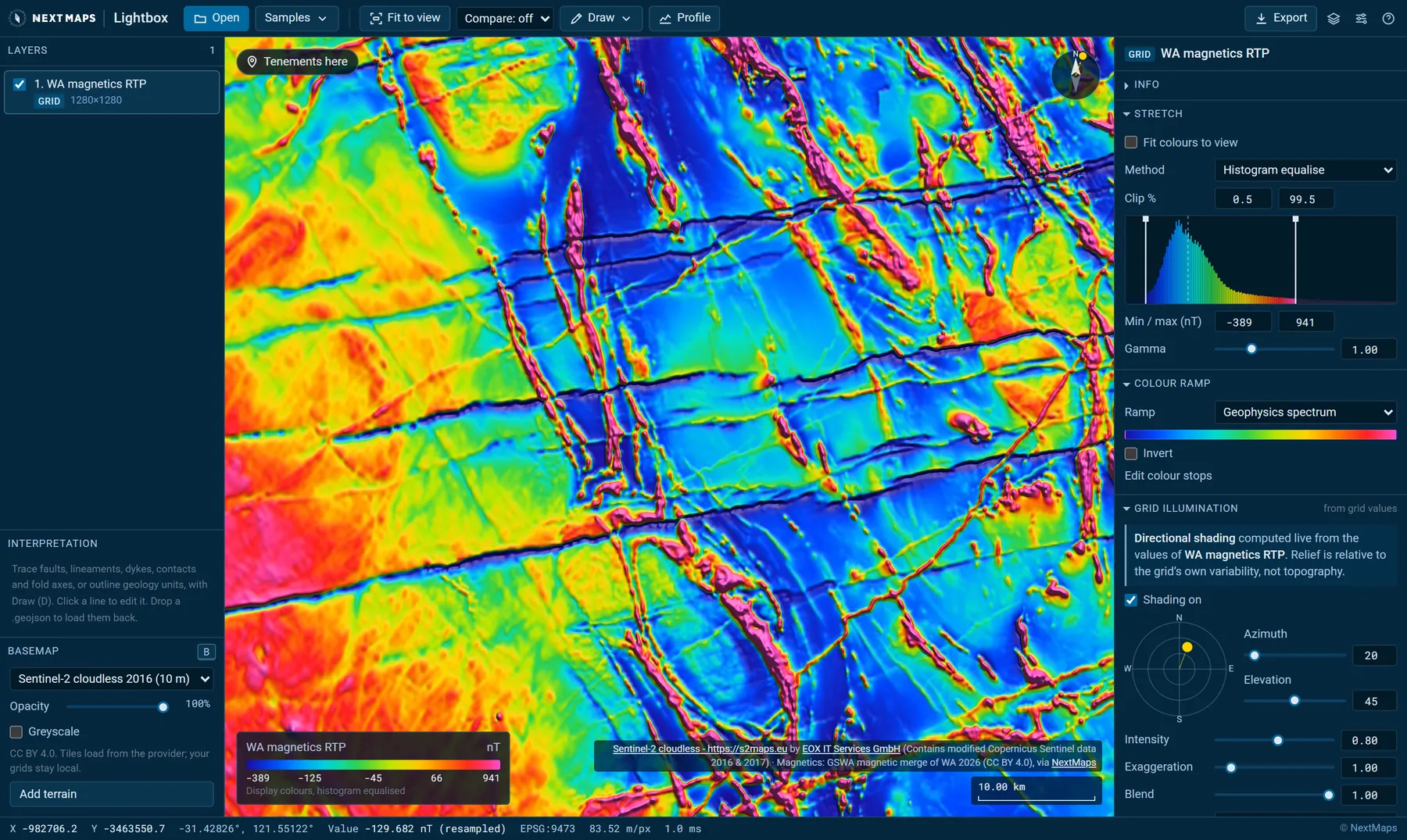
GSWA magnetics (reduced to pole) over the Widgiemooltha dyke swarm, south of Kambalda, lit from the north-north-east.
Opens what you have
The grids your contractor sent. No conversion first.
Lightbox reads the formats geophysical grids actually arrive in, keeps their original values and works out where they sit on the earth.
GeoTIFF, including Cloud Optimized GeoTIFFs, tiled or striped, in any of the usual compressions.
ER Mapper.ers, opened with its data file, in any cell type, with ER Mapper's own datum and projection names.
Geosoft / Oasis montaj.grd, compressed or not, rotated grids included, with the coordinate system from its .grd.xml.
5,306 coordinate systems: MGA and AMG, every UTM zone, NAD27 and NAD83, ETRS89, SIRGAS, the Gauss-Kruger zones and more, read from the file, a .prj, an .aux.xml or embedded WKT. If a file does not say, assign one yourself.
The readout shows the stored value of the cell under the pointer. The display never changes the data.
Drop your grids here
They open straight in Lightbox, read by your browser. Nothing is uploaded.
ER Mapper: bring the .ers and its data file together
Geosoft: add the .grd.xml for its coordinate system
Several grids at once open as layers
See the structure
Move the sun. Watch the dykes appear.
Stretch, colour and shading are worked out live from the grid's own values on your graphics card. None of it changes the data.
Sun shading calculated from the grid itself. Swing the sun round and watch structures at each strike come and go, or light it from six directions at once.
Histogram equalise, percentile, standard deviation or manual stretches, with ten colour ramps or your own.
Fit colours to view: the stretch follows you as you pan, so a subtle anomaly in quiet ground gets the full ramp, and the colour bar says where that range sits in the whole grid.
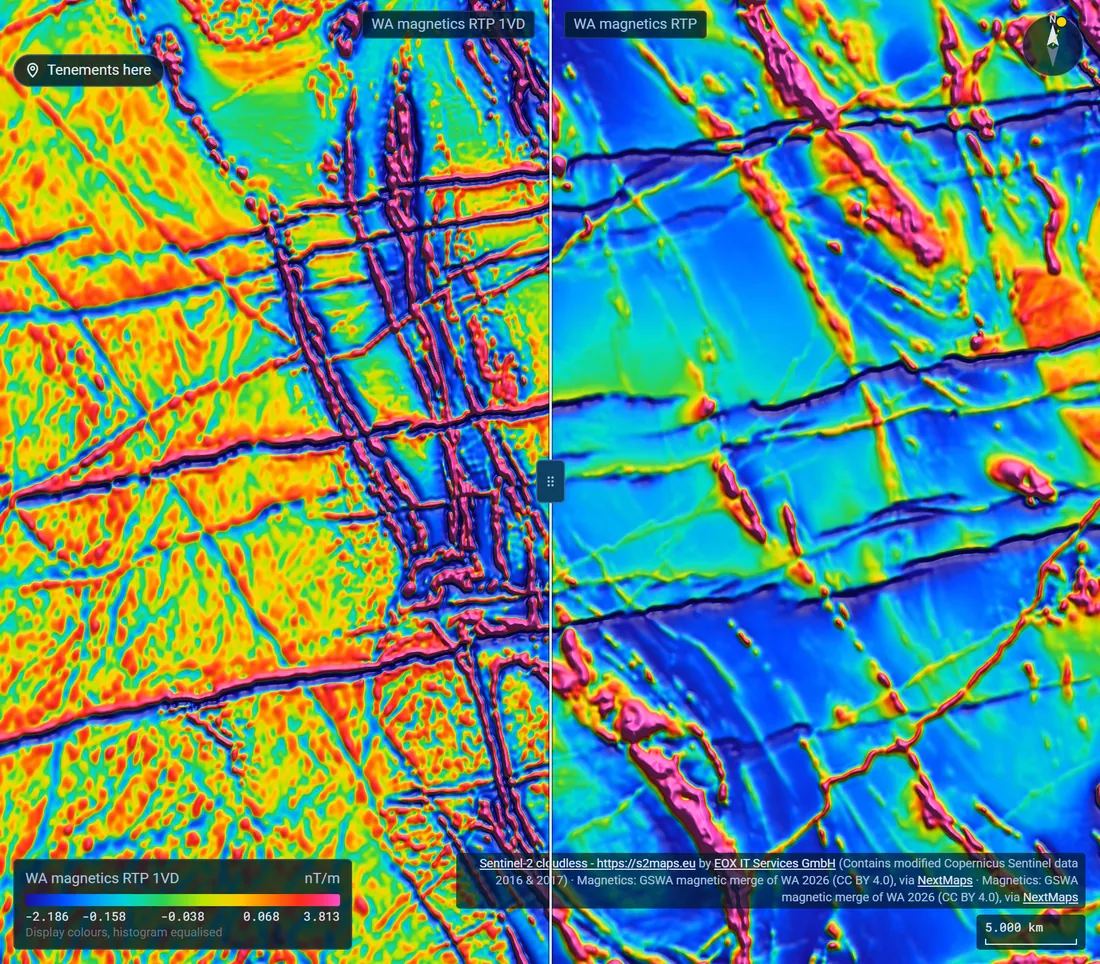
First vertical and tilt derivatives in a click, as new layers.
Stack grids as layers with blend modes, drape a DEM, or compare two with a swipe or side by side.
Satellite basemaps and worldwide terrain under your grids, reprojected to line up with them.
Swipe between the RTP and its first vertical derivative.
Interpret it
Trace the interpretation on the grid itself.
Draw lines in the types an aeromagnetic interpretation uses, with the symbols geological maps use, and outline geology units as you go.
Faults (normal, reverse, thrust and strike-slip), shear zones, dykes and reversely magnetised dykes, magnetic lineaments, form lines, contacts, fold axes and palaeochannels, drawn with FGDC map symbols.
Certain, inferred or speculative on every line. New points snap to nearby lines, so contacts end exactly on faults.
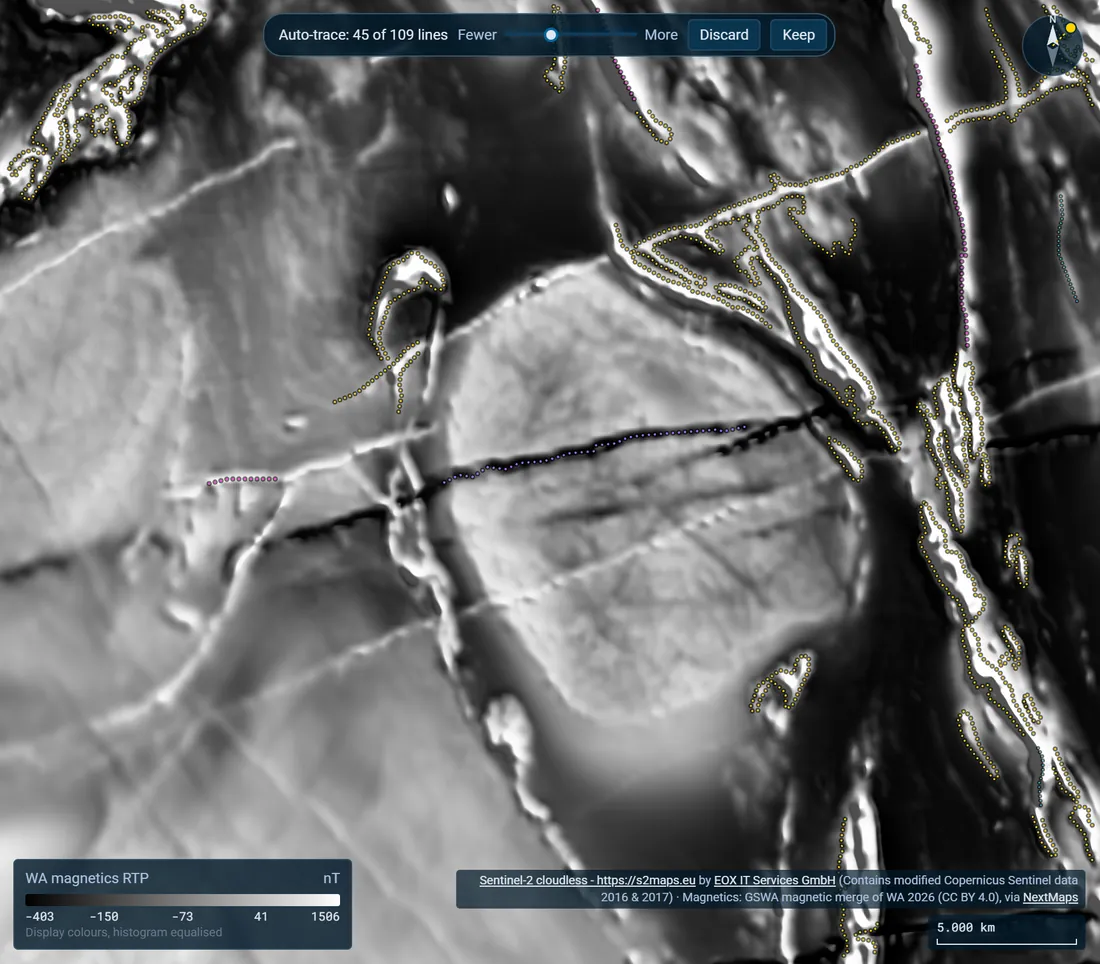
Auto-trace (beta) proposes dykes, form lines and contacts from the grid in view, worked out in your browser in a few seconds. Thin them, keep them or discard them.
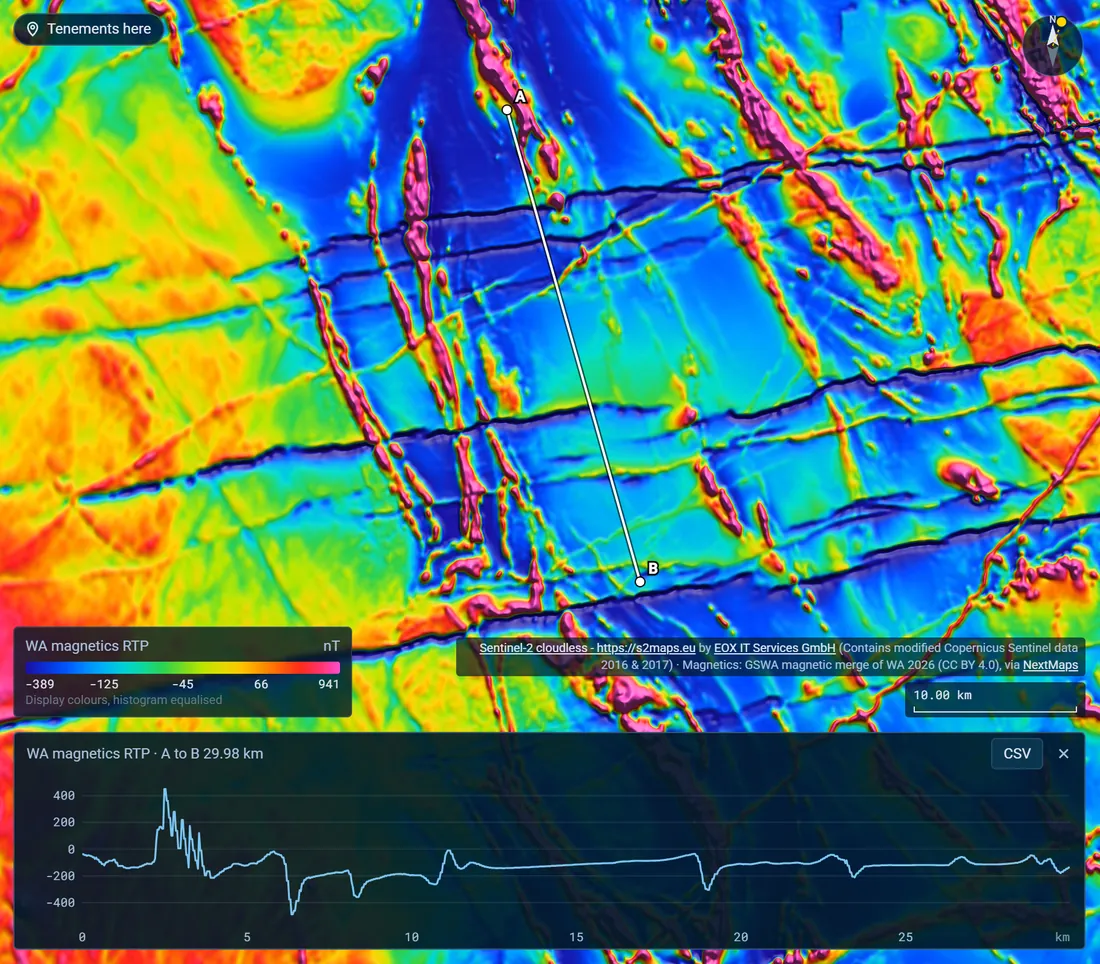
Profiles: draw a line from A to B to graph the grid along it, and save the values as CSV.
Auto-trace proposing contacts and dykes from GSWA magnetics between Coolgardie and Kambalda, shown in greyscale.
Take it with you
Back into your GIS, in your own coordinates.
A project file (.lightbox) holding everything open, grids included, to open again on any computer or hand to a colleague. Lightbox also saves your session in the browser as you go.
Your interpretation as a zipped shapefile in the grid's own coordinate system, with a matching .prj, or as GeoJSON. Type, confidence and length go in the attributes.
Load a GeoJSON back in to carry on where you stopped. Common type names from other packages are recognised.
Working in WA? With Premium, send your interpretation straight to My Layers on the NextMaps map, over the tenements.
The view as a PNG up to four times screen resolution, with a legend strip carrying the colour bar, sun position and scale.
A georeferenced GeoTIFF of the rendered layer, for a report figure or a GIS backdrop.
Share links that carry the view, every layer's settings and the interpretation, but not the grids: whoever opens one is asked for the files.
A 30 km profile across the dyke swarm. The reversely magnetised dykes show as sharp lows.
Your data stays yours
Read on your computer. Never uploaded.
Survey data is often confidential, and it should not have to leave your machine just so you can look at it. Lightbox decodes every grid inside your browser: the file is read from your disk and drawn on your graphics card. NextMaps never receives it, and neither does anyone else. Lightbox keeps your last few sessions, grids included, in this browser's own storage on your computer, so you can pick up where you left off, and files dropped on this page reach Lightbox the same way.
Beyond the page itself, the only data Lightbox fetches is map tiles: the satellite basemap and terrain from their providers, and NextMaps' WA grids if you add them. Share links keep the view and your interpretation in the part of the link after the #, which browsers never send to a server. Usage analytics record which tools get used, never file names, coordinates or values.
Working in Western Australia?
The state's geophysics, a click away.
Add the GSWA statewide magnetics (TMI at 20 m; RTP and the first vertical derivatives at 40 m), radiometrics (K, Th, U and dose rate at 40 m), gravity (Bouguer, isostatic residual, first vertical derivative and tilt at 400 m) and the GA SRTM elevation model as real grid layers, loading finer detail as you zoom in. They need a free NextMaps account.
Want to know who holds the ground under an anomaly? The same grids sit under every live tenement, application and WAMEX report on the NextMaps map, and the "Tenements here" link in Lightbox opens the ground you are looking at there.
The Lightbox user guide covers the rest, from the side files each format needs to getting your interpretation into QGIS.
Is Lightbox free?
Yes. Anyone can open grids and look at them without an account. A free NextMaps account unlocks the display controls (stretch, colour ramps and sun shading), comparing layers, terrain, the WA statewide grids, drawing, profiles, derivatives, share links and exports.
Are my files uploaded anywhere?
No. Lightbox reads your grids inside your browser, on your own computer. NextMaps never receives them. The only data it fetches is map tiles: the satellite basemap and terrain from their providers, and NextMaps' WA grids if you add them. Share links carry the view and your interpretation, not the grids.
Which file formats does it open?
GeoTIFF (including Cloud Optimized GeoTIFFs), ER Mapper .ers opened with its data file, and Geosoft / Oasis montaj .grd, with the .grd.xml alongside for its coordinate system. Surfer and netCDF files that also use the .grd extension are not supported. It cannot read ECW or MrSID files, whose decoders are licensed for desktop software only, and those are usually a coloured picture rather than values anyway: open the grid itself, or save a GeoTIFF from QGIS.
Does it handle my coordinate system?
Almost certainly. Lightbox knows 5,306 EPSG coordinate systems, from MGA and AMG to every UTM zone, NAD27 and NAD83, ETRS89, SIRGAS and the Gauss-Kruger zones, each checked against PROJ to within a metre. It reads the system from the file, a .prj, a GDAL .aux.xml or embedded WKT. If a file does not say, assign one by name or code.
Can I take my interpretation into QGIS or ArcGIS?
Yes. Save your lines and polygons as a zipped shapefile in the grid's own coordinate system with a matching .prj, or as GeoJSON. Each line keeps its type, confidence and length in the attribute table, and you can load a GeoJSON back into Lightbox to carry on.
What does Auto-trace do?
Auto-trace is a beta tool that proposes dykes, form lines, reversely magnetised dykes and contacts from the grid in view, using edge and ridge detection that runs in your browser. The lines arrive marked speculative for you to thin, keep or discard. It does not trace faults, and it works best on a reduced-to-pole magnetic grid.
Is it a processing package?
No. Lightbox does not grid, level or filter survey data beyond first vertical and tilt derivatives. It takes the grids you already have and makes them quick to look at, compare and interpret.
Does it work on a phone?
Yes: pinch to zoom and tap for a value. It is built for a laptop or desktop, though, where the layer and settings panels have room.