
WA geophysics you can restretch and relight, plus shaded relief
The magnetics, radiometrics and gravity on the NextMaps map are now drawn from GSWA's raw grids, not finished pictures. Fit the colours to your view, see where it sits in WA, move the sun and read real values. Plus new gravity layers (isostatic residual, 1VD, tilt) and free WA shaded relief.
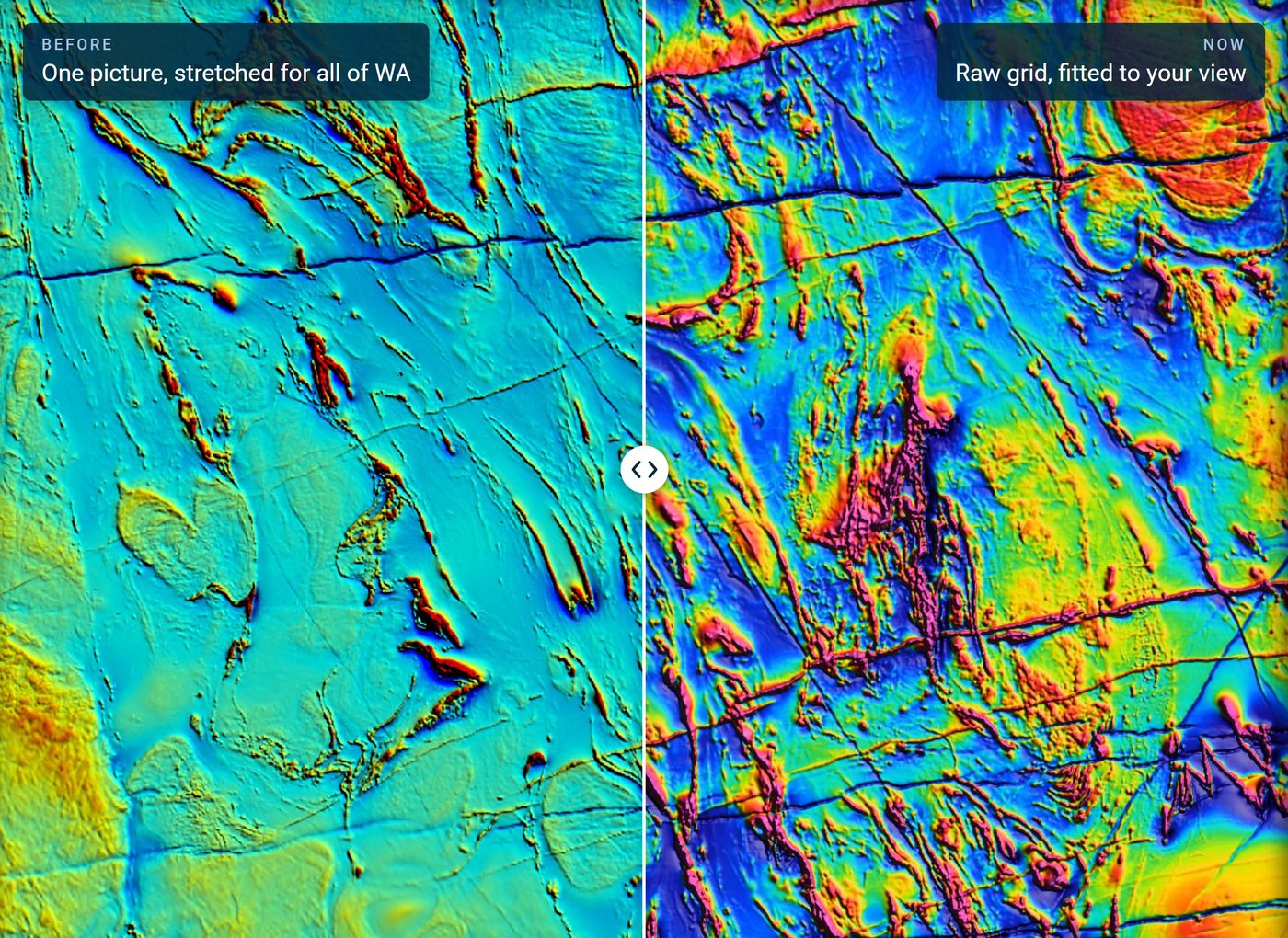
The magnetics, radiometrics and gravity on the NextMaps map used to be DMPE's published images. They are finished pictures: one colour stretch fitted to the whole of Western Australia, with the shading sun fixed in the north-east. That works for a statewide overview. Zoom into a district and it falls apart. Around Kalgoorlie most of the screen was a single band of cyan, and a picture cannot be restretched or relit.
So we rebuilt the geophysics from GSWA's raw grids. Every layer is now drawn in your browser from the measured values, so the colours can follow your view, the sun can move, and the map can tell you the number under your cursor. We also added shaded relief for the whole state, free for everyone.
What is on the map
- Magnetics: GSWA's 2026 merge of WA at 80 m. TMI, RTP, and the first vertical derivative of each.
- Radiometrics: the 2026 merge at 40 m. Potassium, thorium, uranium and dose rate, plus a KTU ternary that now stretches each channel on its own.
- Gravity: GSWA's 400 m Bouguer merge, plus three layers we derived from it: an isostatic residual, its first vertical derivative and its tilt angle.
They are all under Layers, Geophysics.
Colours that follow your view
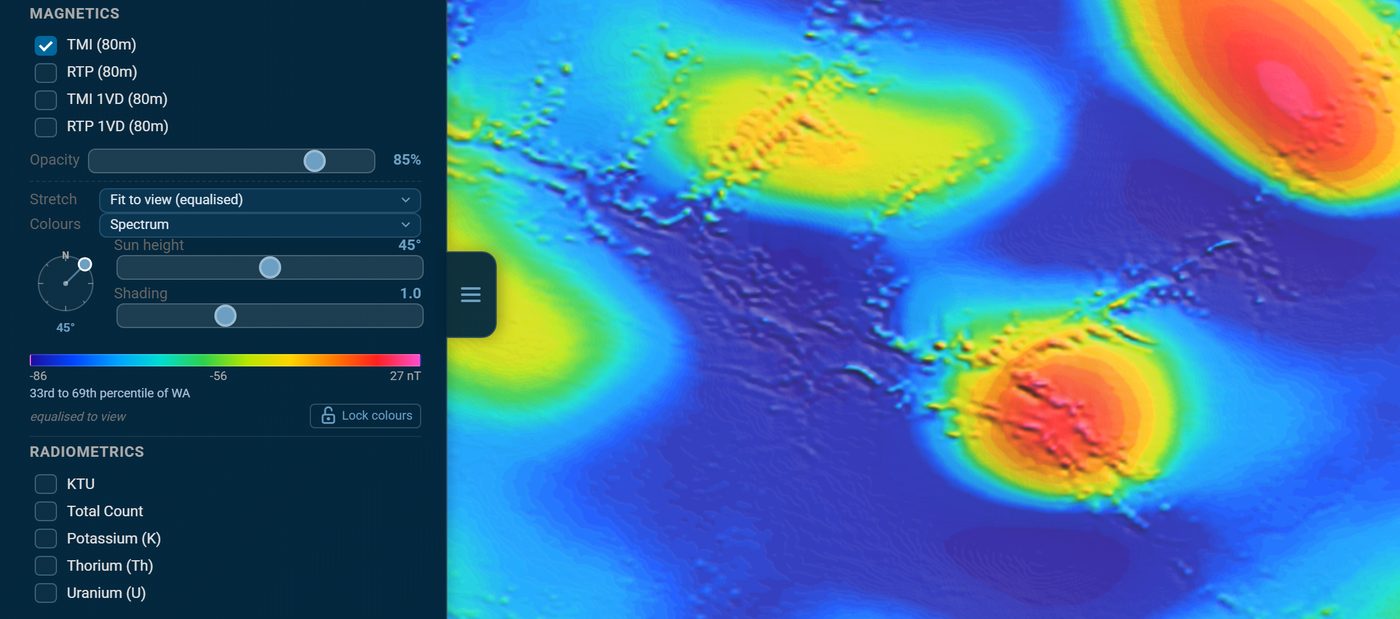
Set the stretch to Fit to view and the colour ramp spreads across whatever is on screen, recalculated as you pan and zoom. Equalised gives every colour an equal share of the view; linear runs from the 2nd to the 98th percentile. Statewide keeps one stretch for all of WA, so a colour means the same value everywhere. The colour ramps are spectrum (the GSWA convention), greyscale and viridis.
A stretch fitted to the view has a catch: it makes every patch of ground look hot. Three things keep it honest.
- A colour bar in real units: nT for magnetics, % and ppm for radiometrics, µm/s² for gravity. It also appears in the map legend and in exports.
- Where your view sits in WA. Under the bar, a line places the range on screen against the whole state. In the quiet magnetics of the Great Sandy Desert below, the view runs from -86 to 27 nT and the line reads "33rd to 69th percentile of WA". The red anomaly in the middle is ordinary by statewide standards.
- Lock colours holds the current stretch while you pan, so neighbouring ground is compared on the same scale.
Hover anywhere and the value under the cursor shows in the status bar.
Move the sun
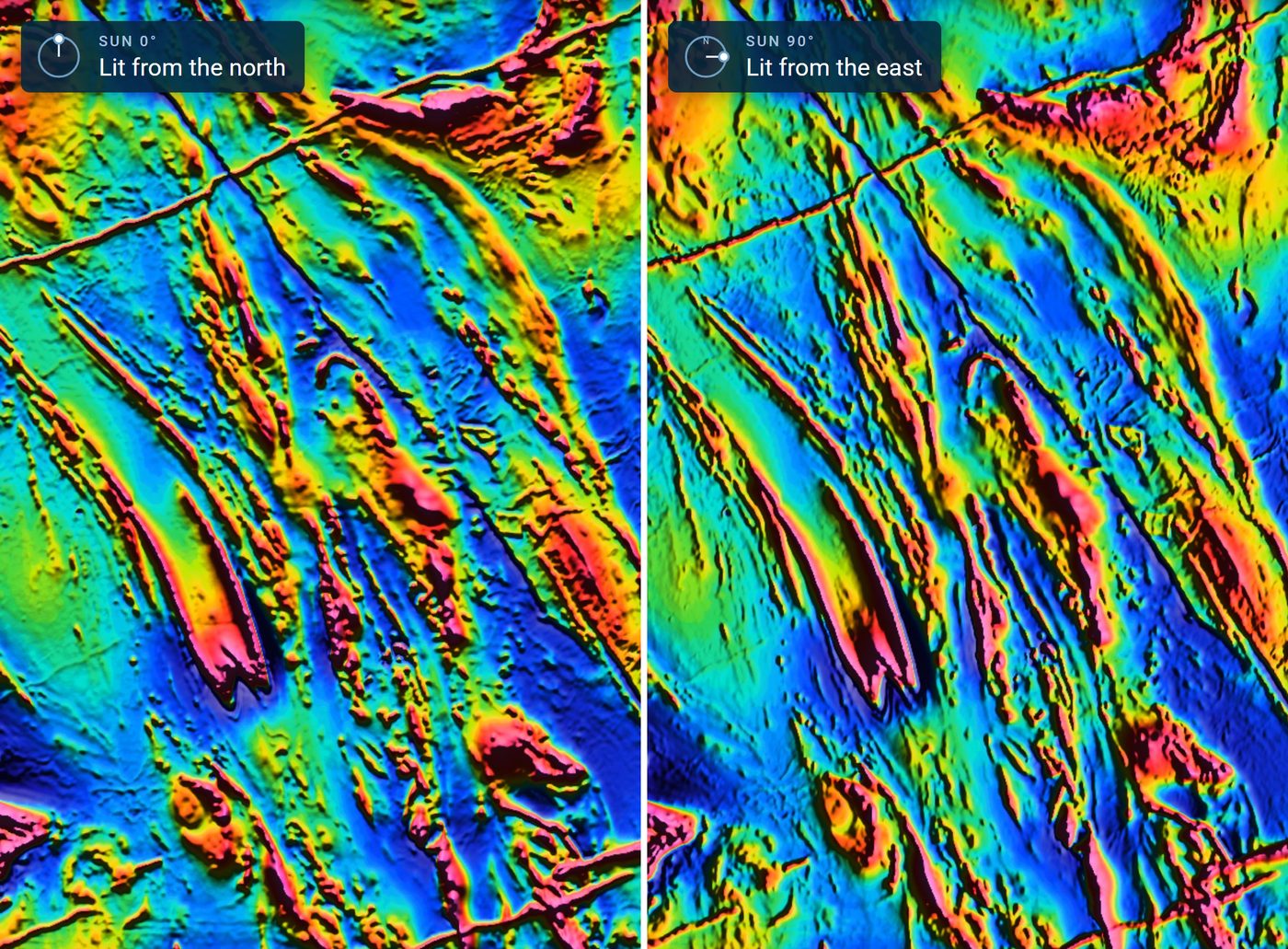
Shading picks out gradients that face the light and hides those that run parallel to it. DMPE's images were lit from the north-east, so north-east-trending structure was always the hardest to see. Now there is a dial: drag the sun round to light across the strike you care about. A sun height slider lowers the light to bring out subtle gradients, and a shading slider sets the strength or turns it off. Reset to default puts everything back.
Here is the same RTP view near Kalgoorlie with a low sun. Lit from the north, the east-north-east dykes stand out. Lit from the east, the north-north-west stratigraphy takes over.
Gravity, with the deep signal taken out
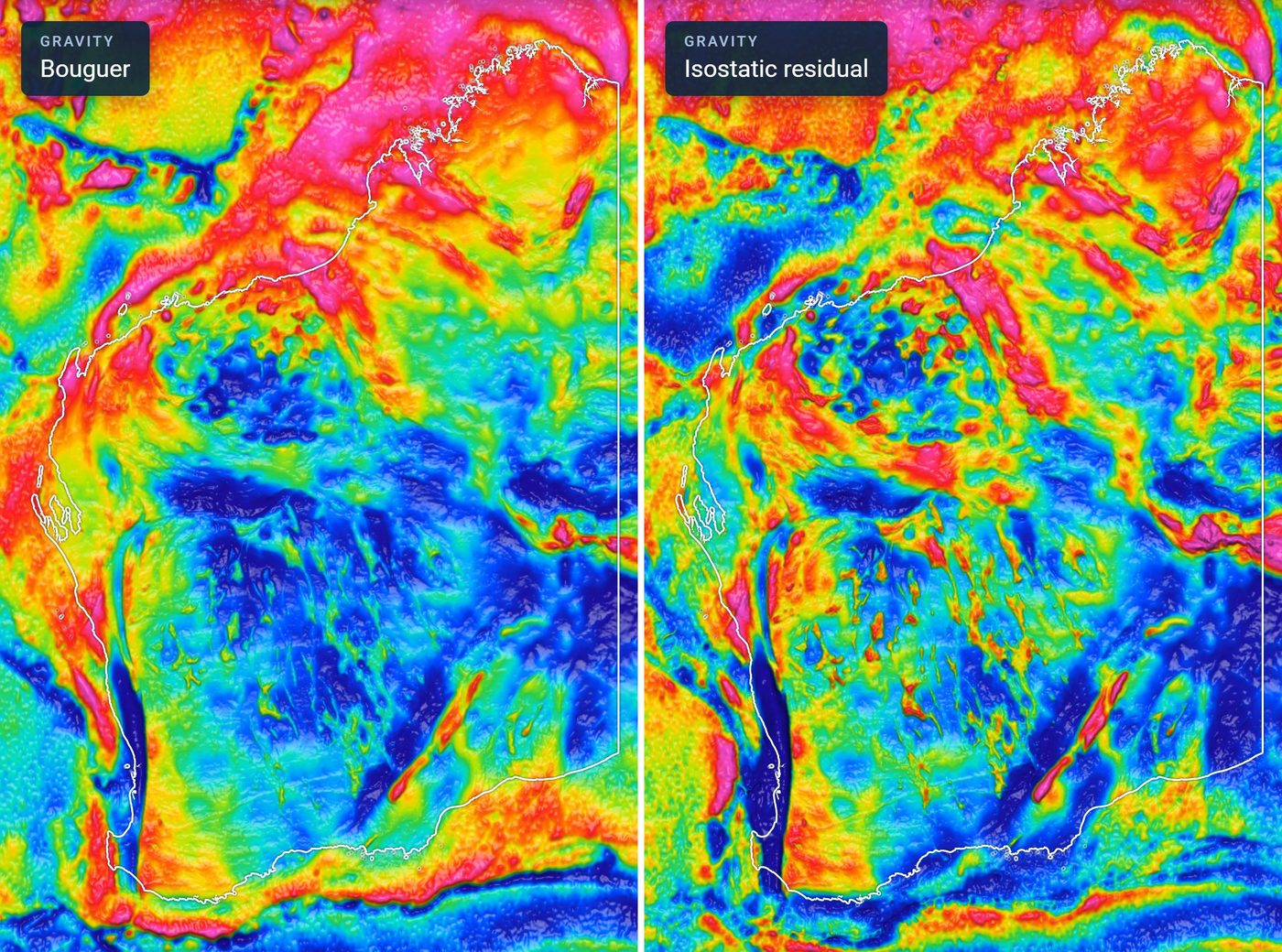
Bouguer gravity carries a long-wavelength signal from the base of the crust, where the crust thickens or thins and the mantle compensates. Across a state the size of WA that signal dominates: on one statewide stretch the whole Yilgarn sinks to blue and its greenstone belts barely register.
The new isostatic residual removes it, so upper-crustal density contrasts compare evenly from the Kimberley to Esperance. Geoscience Australia publishes an isostatic residual of its own, but it is built from a smoother national grid that leaves out company gradiometer surveys. We applied GA's 2019 isostatic correction to GSWA's sharper 400 m merge instead.
From the residual we also computed a first vertical derivative, in Eötvös, which sharpens shallow sources and their edges, and a tilt angle, which runs from -90° to 90°: positive over dense bodies and near zero at their edges, so weak and strong sources show alike. Neither agency publishes these two as grids. All four gravity layers take the same stretch, colour and sun controls as magnetics.
The residual earns its keep zoomed out. At district scale on a fitted stretch, Bouguer and residual look much alike. Statewide, the difference is plain:
Shaded relief for WA
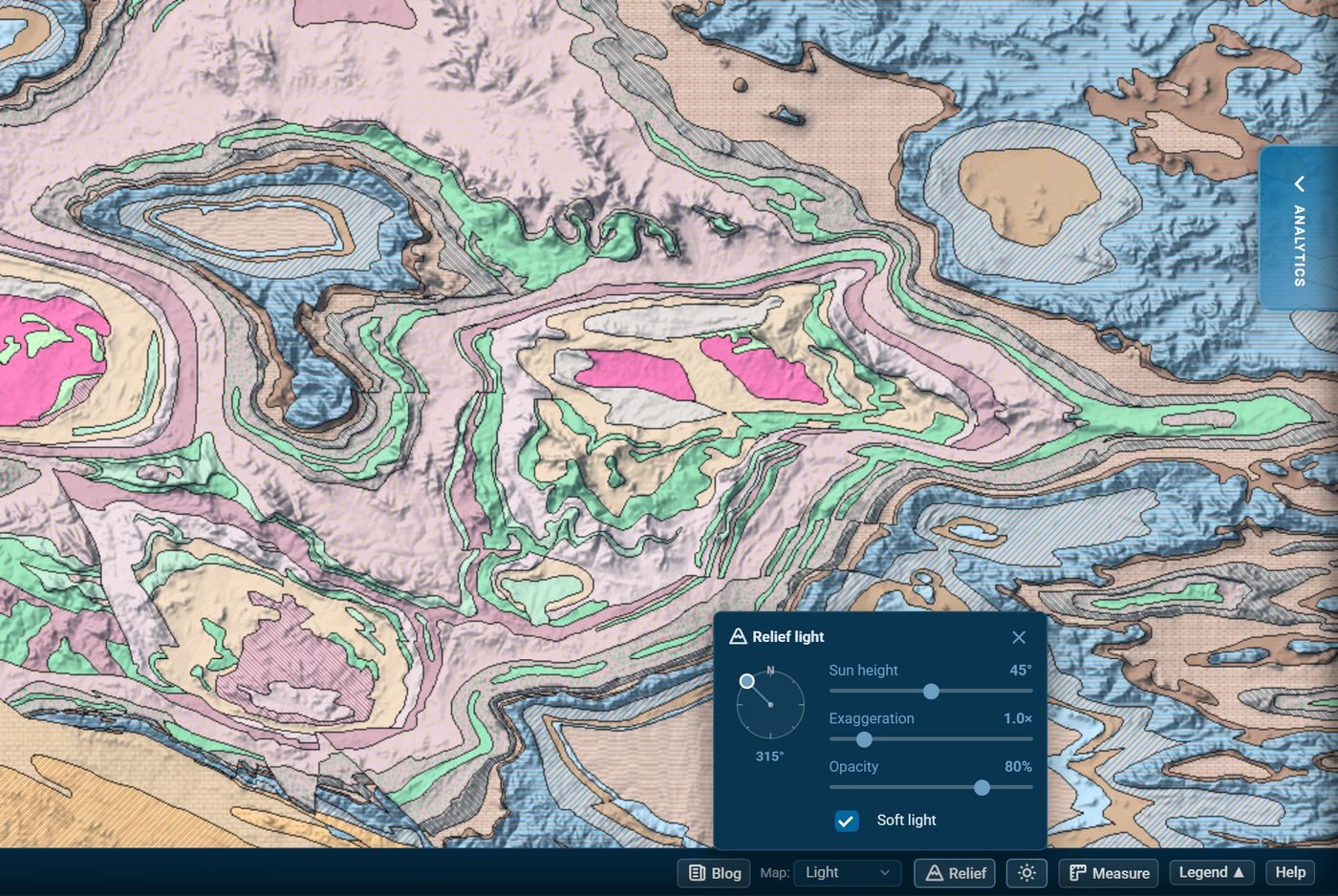
The new Relief button in the status bar, beside the basemap picker, shades the map with Geoscience Australia's 1 second SRTM elevation model (DEM-S: about 30 m, smoothed, with vegetation offsets removed). Flat ground stays clear, so the shading falls over whatever is underneath: any basemap, the geology or the geophysics.
The sun button beside it opens the light settings: a direction dial, sun height, vertical exaggeration up to 4×, opacity, and soft light, which blends in light from four directions so ranges facing the sun do not wash out. The status bar shows the elevation under your cursor, and relief comes through in map exports. Below, it is lighting the 1:500,000 bedrock geology in the Hamersley Range.
We left contours out on purpose. SRTM contours at a useful interval are mostly noise across the low relief of the Yilgarn, where most of our users work. If you need them for a particular area, tell us.
Exports and embeds
Map exports carry the colour bars, with real values, into the legend. Shareable embeds now draw geophysics from the same data, with the stretch, colours and sun you had when you created the embed. Embeds made before this keep the statewide look they always had, and the gravity residual, 1VD and tilt can now be embedded too.
Who gets what
- Shaded relief: free for everyone, no account needed, light settings included.
- Every geophysics layer: with a free account, on the statewide stretch with DMPE's lighting and a colour bar. The familiar look, now drawn from the 2026 grids.
- Premium: fit to view, colour lock, colour ramps, the sun dial and shading, values under the cursor, and the percentile-of-WA line.
Open the map, turn on a geophysics layer and drag the sun round.
Track WA tenements and find ground to peg, sell or buy
NextMaps gives exploration companies and investors instant visibility over the full WA tenement landscape.
Get started →