
ASTER and Sentinel-2 mineral mapping, now in NextMaps
Two new remote-sensing layers in NextMaps: ASTER mineral maps for district-scale alteration, and timestamped Sentinel-2 imagery with mineral-ratio composites for the exact ground you are working. Map iron oxides, clays and silica straight on the WA tenement map, no GIS licence required.
Want to know where the alteration is? The usual answer is a half-day of work: find and download gigabytes of imagery, wrestle Sentinel-2 into QGIS through a couple of half-broken plugins, and try to remember how to set up the band calculations, all before you can even look at the ground.
So we built it into NextMaps. Two new remote-sensing layers, sitting right on top of the WA tenement map, with no GIS licence and no data wrangling. Map iron oxides, clays and silica over your tenure in a couple of clicks.
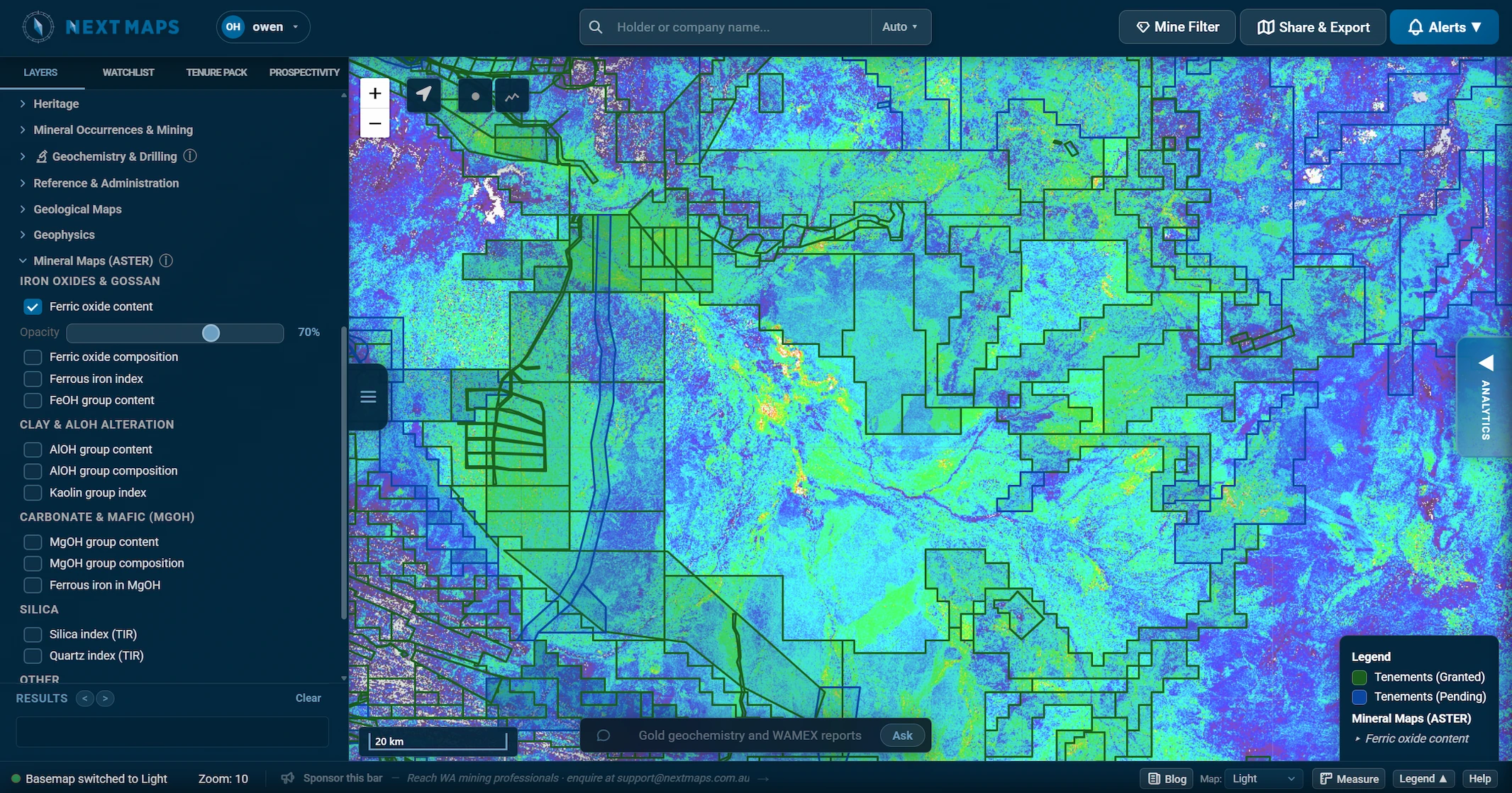
ASTER mineral maps: district-scale alteration, statewide
The first layer brings the CSIRO and Geoscience Australia ASTER Geoscience products straight onto the map. These are pre-processed mineral-group products covering all of WA, so they load instantly with no download or reprojection.
- Iron oxides and gossan: ironstones, gossans and ferruginous regolith
- AlOH clays: phyllic and argillic alteration, white mica, kaolinite
- MgOH and carbonate: chlorite, amphibole, talc and carbonate
- Silica: silicification, quartz veining and silcrete
Fourteen mineral-group products in all, each with its own opacity slider so you can fade them in underneath your tenure and geology. This is the regional view for narrowing down where to focus.
Timestamped Sentinel-2: cloud-free and current, over your ground
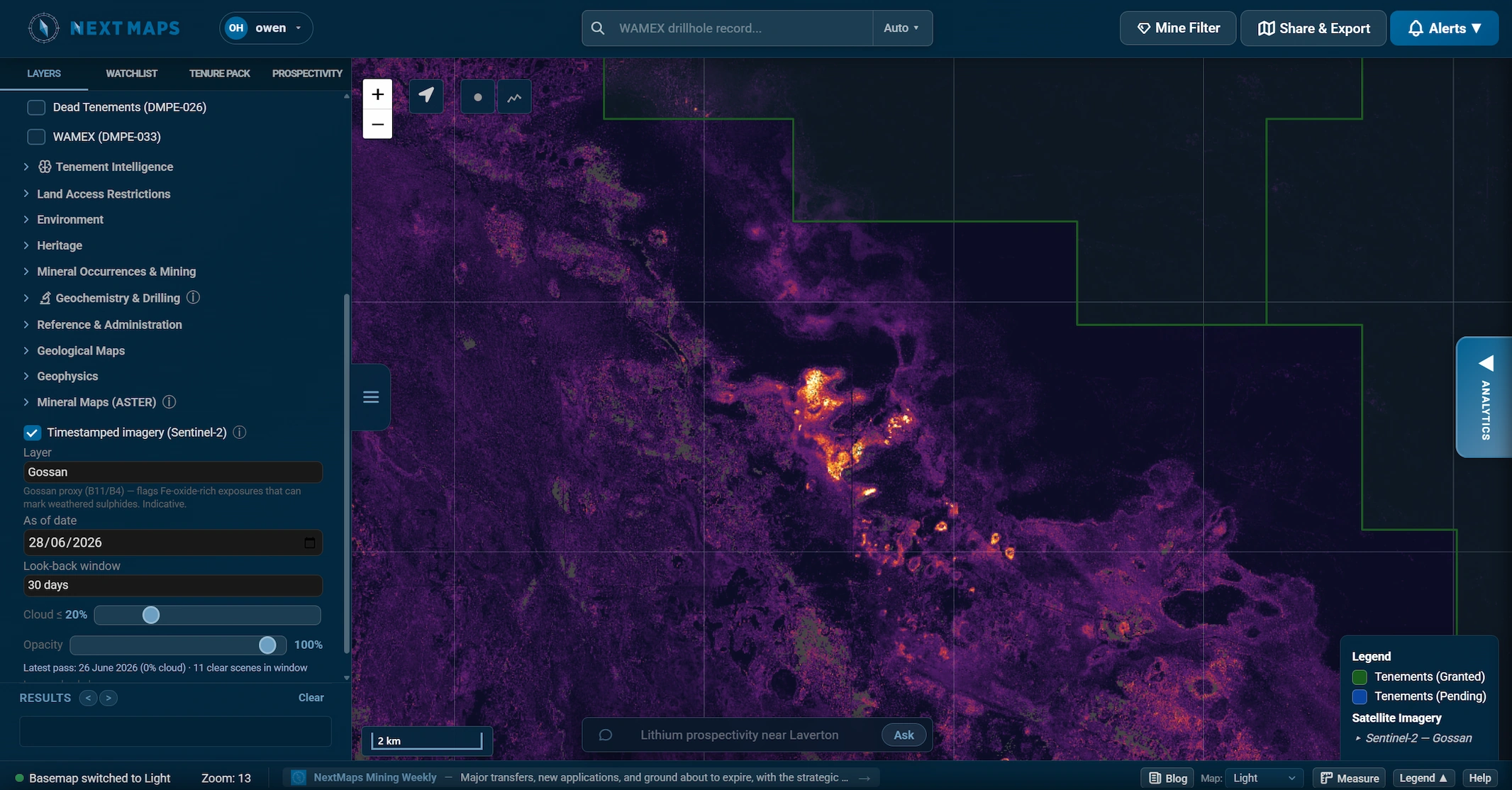
Once ASTER has narrowed it down, switch on timestamped Sentinel-2 to zoom in on the exact block you are working. Set an "as of" date, a look-back window and a cloud limit, and NextMaps builds a fresh 10 m cloud-free mosaic of the clearest pixels in that window. It shows you the date of the latest clear pass, so you always know how fresh the picture is.
As well as true colour, SWIR and geology composites, there are mineral-ratio layers built for exploration:
- Gossan: flags Fe-oxide-rich exposures that can mark weathered sulphides
- Ferric and ferrous iron: iron-oxide-stained ground and mafic responses
- Clay / AlOH alteration: kaolinite and illite-style alteration
Because every pass is dated, the layer doubles as near-live monitoring. With a short look-back window and recent dates, you can often pick out fresh drill lines being cleared, new tracks and camps, and ground disturbance on a neighbour's licence before it shows up anywhere else.
Regional first, then zoom in
The two layers are designed to be used together. Regional ASTER to narrow the search, then dated Sentinel-2 to zoom in and keep an eye on activity. From there, a Prospectivity Data Room reads the WAMEX history behind whatever ground you have flagged.
Both are pathfinders, not truth. A gossan ratio flags an iron-oxide spectral response, not a confirmed gossan, and vegetation and water are masked out so they don't show up as false signal.
Full credit to Grant Boxer, whose excellent QGIS resource (grantboxer.github.io/QGIS.html) first introduced us to these ASTER and Sentinel-2 band-ratio methods. All we have really done is bring them into NextMaps so you can run them in a couple of clicks instead of building the workflow yourself.
Track WA tenements and find ground to peg, sell or buy
NextMaps gives exploration companies and investors instant visibility over the full WA tenement landscape.
Get started →