
NextMaps map user guide
Updated 28 October 2026
The NextMaps map is a live map of mining tenure in Western Australia, with the geoscience and register intelligence you need to judge a piece of ground laid over it. Search any tenement, holder or WAMEX report, click anywhere to see the titles there and their history, add geology, geophysics, geochemistry and satellite mineral maps, and follow the ground you care about with a watchlist and email alerts.
This guide works through the map panel by panel. Labels like Free account Premium Pro show what a feature needs (see Accounts and plans). For the keys, see Keyboard shortcuts; if something does not look right, see Troubleshooting.
Prefer to watch? The video guides take each part of the map in a minute or two, and the sections below carry their video where there is one.
Getting started
Open the map at nextmaps.com.au/map. The first time, you are asked to read and accept the disclaimer. The map draws on data from DMPE and other agencies, and it is a research tool, not legal or investment advice: check anything you act on against the department's own register, Mineral Titles Online.
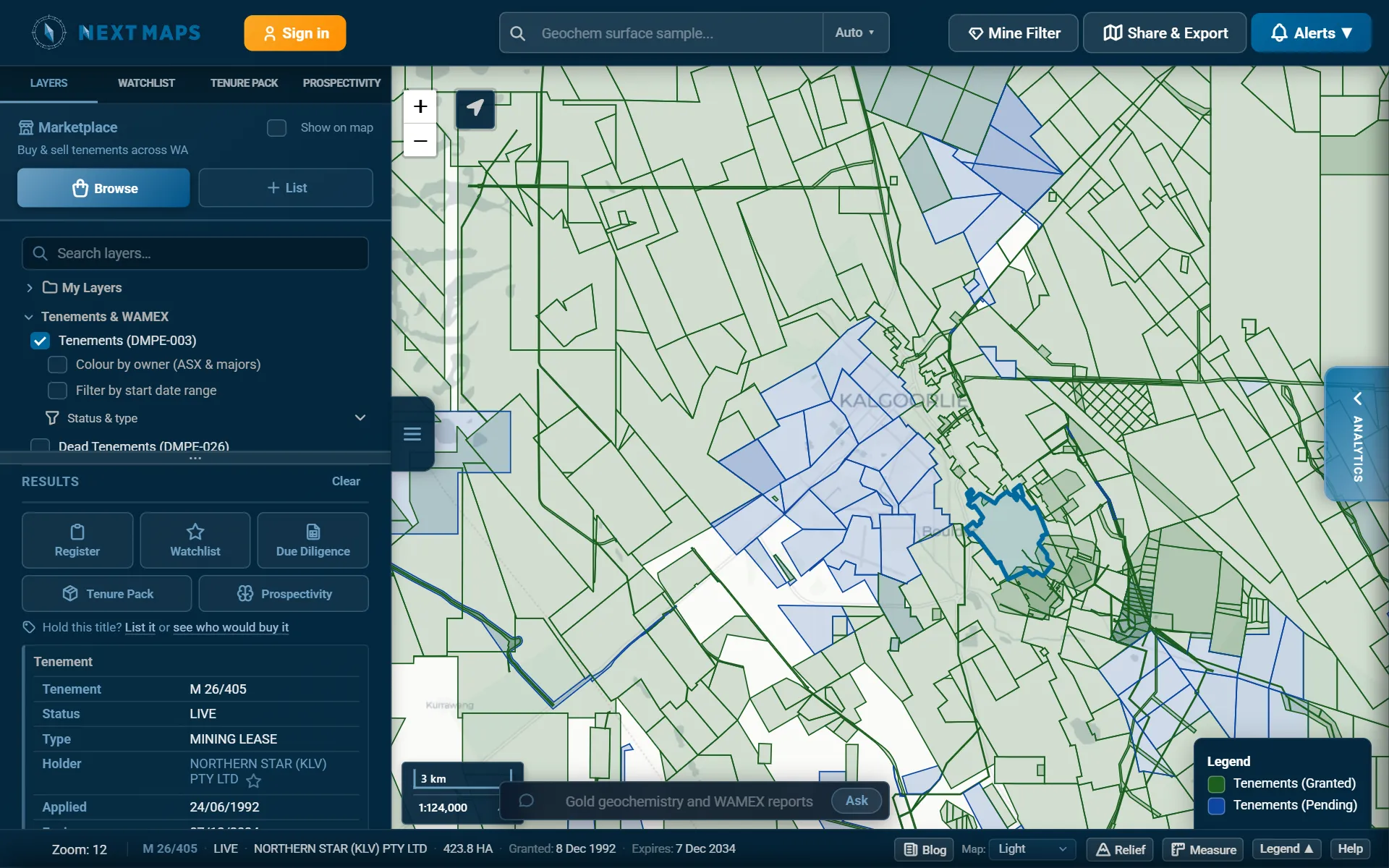
- Search bar: tenements, holders, mines and WAMEX records. See Searching.
- Mine Filter, Share & Export and Alerts (the bell). Your account menu, or Sign in, is at the top left beside the logo.
- Sidebar tabs: Layers, Watchlist, Tenure Pack and Prospectivity. The three-line button beside the sidebar hides and shows it.
- Results: whatever you click or search for. Drag the divider above it to share the height with the tab above.
- The map. Drag to pan; scroll, double-click or use + and - to zoom.
- Analytics: the tab on the right edge opens the market analytics panel. See Analytics.
- Ask the map: type what you want to see in plain words. See Ask the map.
- Status bar: the zoom level and the tenement under the pointer, then Blog, Map (the basemap), Relief, Measure, Legend (hides and shows the legend at the bottom right of the map) and Help.
The scale bar at the bottom left of the map shows the scale as 1:xx,xxx; click it to pick a scale and zoom straight to it. The location button beside the zoom buttons shows where you are (see GPS in the field). On a wide screen the marketplace panel opens on the right on your first visit each session; close it with its x.
Turning layers on
Every layer is in the Layers tab, in sections you open and close. Tick a layer to show it. Many add their own settings underneath when they are on: filters, an opacity slider, display controls.
- Search layers, under the Marketplace card at the top of the tab, filters the list as you type and opens the sections with matches. It understands short forms: mag, ktu, native title.
- Layers drawn from very large datasets need you to zoom in first. Until you have, a zoom button sits beside the layer; click it to jump to a zoom where the layer draws.
- Layers your plan does not include are dimmed. A section's header shows ★ when something in it needs Premium and ◆ when it needs Pro (a section that only needs a free account has no symbol), and a line under the header says what unlocks it: Sign in to unlock, Premium required to unlock, or Some options need Premium where the section partly works. Hover a dimmed layer to see what it needs; click it, or that line, to sign in or see the plans.
- The legend, at the bottom right of the map, explains the colours of the layers that are on. Legend in the status bar hides and shows it.
Common tasks
Where to start for the things people most often open the map to do:
| To | Start here |
|---|---|
| Look up a tenement | Type its ID in the search bar, or click it on the map. Its card gives the holder, dates, area and WAMEX record, and Register opens the full record. See Clicking the map. |
| See who holds an area | Zoom to it and click the titles, or tick Colour by owner to see the listed companies behind the holders at a glance. The Ground in view card in Analytics lists the biggest holders. See Tenements and Analytics. |
| Find ground that may open up | Dead Tenements with its further filter shows ground that was held and is open now. Under Tenement Intelligence, Expiry Timeline, Final-Term PLs, Ground Release Zones and Opportunity Signals show what may come free. See Dead tenements and Tenement Intelligence. |
| Check what exploration has been done | Turn on WAMEX and filter the reports by date, contents and commodity, then add the geochemistry, drillholes and geophysics. For a written summary of the record, ask for a prospectivity report. |
| Prospect an area on foot | 100k Regolith Regimes shows where the rock is at or near the surface, Hallberg Geological Maps draws Jack Hallberg's 1:25,000 geological map of the area, Historical Tenement Plans and Abandoned Mines show old leases and workings, GSWA Field Observations (WAROX) shows recorded outcrop (search its notes for gossan, pegmatite or old workings), and WMC Surface Geochemistry with the Element on gold shows old soil and lag results. See Geology and Geochemistry and drilling. |
| Check ground before pegging | Turn on No-Go Zones and click inside a coloured area to see why it is closed or restricted. The other land access, environment and heritage layers show each source on its own. |
| Follow a competitor or your own ground | Add the holder or the titles to your watchlist and turn on its emails, or set an alert on an area. |
| Take it away | A Tenure Pack bundles a PDF report, the register spreadsheet and the spatial files. Download Map makes a figure for a report. |
Accounts and plans
The tenement map itself is open to everyone. A free account opens most of the map, and Premium and Pro add the intelligence and the paid tools. When you reach something your plan does not include, the map tells you which plan has it.
To create an account or sign in, press Sign in at the top left and continue with Google, Microsoft or your email address.
| Plan | What it includes |
|---|---|
| No account | The live tenement map; clicking a tenement for its details and its WAMEX record; basemaps and shaded relief; where hyperspectral scenes exist; browsing the marketplace; the sample Tenure Pack and prospectivity report. |
| Free account | Search; dead tenements and WAMEX reports; geology, geophysics (with every display control), GSWA geochemistry and open-file drillholes; mines and mineral occurrences; land access, environment, heritage and reference layers; register details on a tenement card; Ask the map, with a daily allowance; listing ground on the marketplace, and a free Tenure Pack for any title in a listing you open; one free Tenure Pack and two free prospectivity reports. |
| Premium | Tenement Intelligence and the timeline; the full tenement register; the tenement, WAMEX and dead-tenement filters and colour by owner; WAMEX surface and drillhole geochemistry; ASTER and hyperspectral mineral maps; MAGIX survey grids; the watchlist and email alerts; uploading your own layers; the Mine Filter; market analytics; map exports; Ask the map without the daily limit. |
| Pro | Everything in Premium, plus unlimited Tenure Packs and due diligence workbooks, 10 prospectivity reports a month, the compliance manager for your own titles, timestamped Sentinel-2 imagery and live map embeds. |
Prices, and the full list for each plan, are on the pricing page. Plans can be paid monthly or yearly, and businesses can ask to pay by invoice. To subscribe, choose Upgrade from your account menu (top left), or click any dimmed feature. Account settings and Billing & invoices are in the same menu, and Refer friends gives you a link that earns you and a colleague a free month of Premium.
A new account
Every new account starts with one free Tenure Pack, one free Survey report and one free Focused report. The first time you sign in, the map offers them, on the tenement you were looking at if there was one.
Searching Free account
Type in the search bar at the top. It suggests matches as you type; use the arrow keys and Enter, or click one.
| Search for | Type, for example | What you get |
|---|---|---|
| A tenement | E 70/1234 | The map zooms to it and lists it in Results. A partial ID lists every match to choose from. |
| A holder | A company or person's name | Their titles, listed in Results to choose from, with a button to add the holder to your watchlist. |
| A mine or project | A site name | MINEDEX sites, major resource projects and operating mines of that name. |
| A WAMEX report | A120000 | The report's area and its record. |
| A WAMEX surface sample or drillhole Premium | Its sample or hole ID | The sample or hole on the WAMEX geochemistry layers, with its assays. |
The button at the right of the bar says what kind of search you are about to run. On Auto, it works it out: an A followed by digits is a WAMEX report, letters followed by digits a tenement, and anything else is matched against holders and mining sites together. Pick a type from the button's menu to force one, which you need for sample and drillhole IDs.
Tenement IDs are forgiving: E70/1234 and e 70/1234 find the same title. A number alone, such as 70/1234, has no letters, so Auto reads it as a name: pick Tenement ID from the button first, and it lists every type of title with those numbers.
The register names whoever holds a title, which is often a subsidiary rather than the company that owns it. So typing a listed company's name also suggests its corporate group, and a subsidiary in the suggestions says which listed company it is part of.
Looking for a layer rather than a place? Use Search layers at the top of the Layers tab. To ask for something in a sentence, use Ask the map.
Clicking the map
Click anywhere and Results lists everything under that point for the layers you have on: tenements first (live, then dead), then land access and heritage, then administration (shires, mineral fields, MAGIX surveys), then geology. Click right on a point (a mine, a sample, a drillhole), a WAMEX report or a marketplace listing and it heads the list.
- Where titles overlap, as applications often do over live ground, each is listed, most recent first.
- Step through the list with < and > or the arrow keys. Clear or Esc empties it and removes the highlight.
- Without clicking, the status bar names the tenement under the pointer.
The tenement card
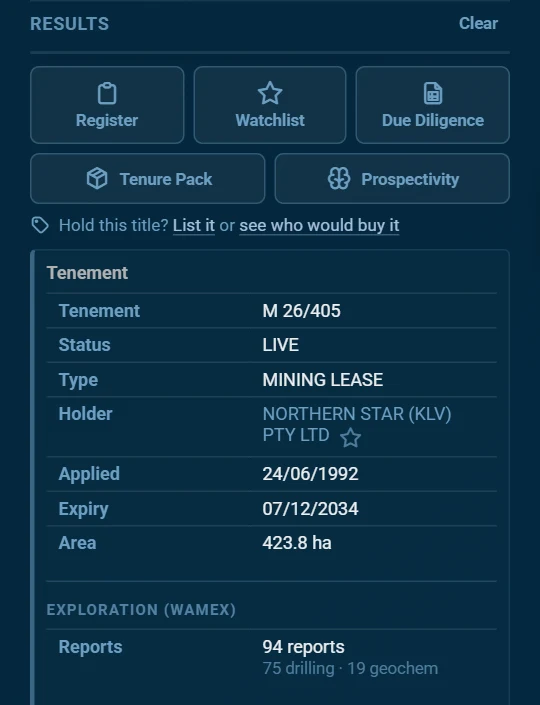
A tenement in Results shows its ID, type, status, holder, dates and area, then fills in more a moment later:
- Exploration (WAMEX): how many open-file reports cover the title, and how many report drilling, geochemistry or digital data. Shown to everyone.
- Register details Free account: the holders and their shares, the listed group a holder belongs to, district and shires, grant date and term, rent status, any combined reporting group and native title.
- Tenement intelligence Premium: signals such as a forfeiture, overdue rent or a dormant title, spend compliance and its trend, expiry band, ownership age, encumbrances and transfers.
A holder's name opens their Holder Activity Premium, their recent register events across all their titles, and the star beside it adds them to your watchlist. An A-number in any record searches for that WAMEX report.
Above the card, buttons act on the selected tenement. A faded button needs a plan you do not have; hover it to see which.
| Button | What it does |
|---|---|
| Register Premium | Opens the title's full register record. See The tenement register. |
| Watchlist Premium | Follows this title: highlighted on the map and, if you choose, emailed when it changes. |
| Due Diligence Pro | Downloads the due diligence workbook (XLSX) for the title: the same register spreadsheet that comes in a Tenure Pack. |
| Tenure Pack | Opens the Tenure Pack tab with this title filled in. See Tenure Packs. |
| Prospectivity | Opens the Prospectivity tab with this title filled in. See Prospectivity reports. |
Under the buttons, Hold this title? lets you list it on the marketplace or ask for a review of who would buy it. With the compliance manager Pro, a Compliance row shows which of your portfolios hold the title, and adds or removes it.
The tenement register Premium
Register on a tenement card opens the title's full record from DMPE's register in a panel along the bottom of the screen. Drag its top edge to make it taller; x or Esc closes it.
The header gives the holder, type, district, area and expiry, with pills for the rent status and the last expenditure year. View on MTO opens the same title on DMPE's Mineral Titles Online. The tabs:
| Tab | What it holds |
|---|---|
| Summary | The title at a glance: status, dates, term, area and the key figures. |
| Holders, Holder Changes | Who holds it and in what shares, and every change of holder. |
| Expenditure | Each year's minimum and reported spend, and any exemptions. |
| Rent | Rent due and paid by year. |
| Conditions, Endorsements | The conditions and endorsements on the grant. |
| Dealings | Transfers, mortgages, caveats and other registered dealings. |
| Bonds | Any bond obligation on the title. |
| Blocks | The graticular blocks the title covers, by plan. |
| Relationships | Other titles it is linked to on the register, how, and their status. |
| Shires, Native Title | The local government areas it falls in, and native title processes. |
| Combined Reporting | The combined reporting group it belongs to, if any. |
Tenements and WAMEX
The Tenements & WAMEX section of the Layers tab holds the core tenure layers.
Tenements
Tenements (DMPE-003) is on when the map opens: live titles in green and applications in blue. The layer is rebuilt every night from DMPE's data. Titles that DMPE's notices feed reports surrendered or withdrawn during the day come off the map without waiting for the rebuild. Blocks a title has had to give up in a compulsory partial surrender are outlined with a dashed line until the date they open for application: click one for that date and the title's history.
Under it:
- Status & type Premium: show only live titles or applications, and only some types: E (exploration licence), P (prospecting licence), M (mining lease), L (miscellaneous licence), G (general purpose lease). The x resets it.
- Filter by start date range Premium: titles that started between two dates. The clipboard button sends them to Results as a list.
- Colour by owner (ASX & majors) Premium: colours every title by the listed company or major that owns its holder, so a company's ground reads as one colour however many subsidiaries hold it. The ten companies with the most titles in view get their own colours in the legend. Click a company in the legend to fade everything else; Watch there makes it a watchlist group that follows the company's subsidiaries. Grey means no listed or major parent was found, not that the ground is privately held.
Once your watchlist has something in it, a Watchlist tick box at the top of the section turns its highlight on and off.
Dead tenements Free account
Dead Tenements (DMPE-026) shows titles that have ended. Filter by death date range Premium narrows them to a period, and then Further filter dead tenements against Tenements Premium cuts away every part now covered by a current title or application: what is left is ground that was held and is open now.
Historical tenement plans Free account
Historical Tenement Plans (DMPE) outlines, in orange, the area each of DMPE's scanned historical tenement plans covers: old goldfield plans, and the 1:10,000 Kalgoorlie and Boulder plans among them. Old leases on these plans point to old workings. Click inside an outline to list every plan covering the point, most detailed first, with its scale and the years each edition was in use. The links under a plan open each edition's scan on DMPE's GeoDocs site.
WAMEX reports Free account
WAMEX (DMPE-033) shows the areas covered by open-file mineral exploration reports. Click one for its record: A-number, title, operator, project, target commodity, report type and period, keywords, and links to the report and its abstract on DMPE's WAMEX system.
Its filters Premium:
- Filter by report date range: Last 5y, Last 10y, a decade, Pre-1980, All Time, or your own dates.
- Report contents, all of which must match: drilling reported; geochemistry or sampling; geophysics; contains a resource estimate; final surrender reports only; has a digital data package; hide "no exploration" reports.
- Target commodity: tick any of the common ones (gold, nickel, copper, lithium, rare earths and others), or type another in Other.
Tenement Intelligence Premium
The Tenement Intelligence section holds layers that read DMPE's register for you, refreshed daily. Each colours the titles it picks out (the two market activity layers colour grid cells instead); hover or click for the detail behind a colour. Turning one on switches the plain Tenements layer off so its colours read clearly: tick Tenements again to see both.
| Layer | What it shows |
|---|---|
| History | |
| Tenement Timeline | What changed on the ground over a period. See The timeline. |
| Acquisition signals | |
| Active Forfeiture Notices | Titles under a forfeiture notice that has been lodged but not yet finalised or withdrawn. |
| Before the Warden | Titles with a matter listed in the Warden's Court: forfeiture applications and plaints, and ballots between competing applications. Tick Include objections and admin matters for the rest. Cause lists are published about six weeks before the hearing; the clipboard lists the matters in Results, soonest hearing first. |
| Distressed Tenements | Holders under financial or legal pressure: an active forfeiture, rent overdue, expiring with no renewal, severely underspent, or mortgaged. |
| Combined Reporting Groups | Titles in combined expenditure reporting groups, coloured by each member's own five-year spend compliance, with one anchor per group (its biggest spender). |
| Final-Term PLs | Prospecting licences in their last permitted term. No further renewal is allowed, so they will expire. |
| Expiry Timeline | Live titles coloured by the time left to expiry. A title past its expiry date may have a renewal pending. |
| Activity and work | |
| Expenditure Compliance | The latest completed reporting year's spend against the minimum, net of any exemption granted: green 100% or more, amber 50 to 99%, red under 50%. The slider shows only titles at or below a level. |
| Exploration Intensity | Spend per hectare, ranked within each tenement type, over a window or for one year. |
| Opportunity Signals | Ground showing signs of neglect or availability: underspent, explored lightly and held a long time. |
| Pre-Drill Signal | Exploration licences where heritage survey spend jumped to three times its usual level or more while exploration spend stayed flat: often the step before drilling. Spend is reported late, so the drilling may already have happened. |
| Conversion Pipeline | The holder has applied to convert to a mining lease, which usually means a resource has been defined. |
| Ownership | |
| Recently Transferred | Titles that changed hands within the window you set, from 1 to 36 months. |
| Ownership Age | Time since the last change of ownership, or since grant if it has never been transferred. |
| Active Dealings (Encumbered) | Titles with an active mortgage, a caveat, or both. |
| Market activity | |
| Application Hotspots | Cells about 11 km across, coloured by how many different companies have applications pending in them over the window you set (30 to 365 days): where ground is being contested. |
| Ground Release Zones | Cells about 11 km across where ground is opening up. Warm cells are about to lapse with no renewal lodged; cool cells were released within the window you set. Strong signals only is on to start with. DMPE usually takes 4 to 6 weeks to gazette a surrender, so a warm cell may already have one lodged. |
These layers are signals read from the register, not conclusions. A title can look overdue while a payment or an exemption is being processed. Check the register, and Mineral Titles Online, before acting on one.
The timeline Premium
Tick Tenement Timeline, at the top of Tenement Intelligence, to colour what changed on the ground over a period:
| Colour | Change |
|---|---|
| Green | New: an application lodged or ground picked up |
| Red | Dropped: surrendered, withdrawn, expired or forfeited |
| Orange | Partial surrender: the title shrank |
| Purple | Holder change |
| Yellow | Status change, such as an application granted |
| Light blue | Boundary change |
- Choose the period with Today, 2d, 7d, 30d, 90d, a calendar month, or your own From and To dates. The arrows either side move the period back and forward.
- The badges count each kind of change. Click one to hide or show that kind.
- Day by day: play steps through the period a day at a time, at 0.5x to 8x; the step buttons go back or forward a day. The x on the date bar shows the whole period again.
- Click a change for its details, then Tenement History for every register event on that title since it was granted, grouped by year, or Holder Activity for the holder's.
- Today's changes include those in DMPE's notices feed that the nightly data has not caught up with yet.
- While the timeline is on, blocks due for compulsory surrender are drawn hatched.
Land access, environment and heritage Free account
Three sections of the Layers tab show what constrains access to ground. They come from the WA government's SLIP services, live or refreshed nightly; click inside an area to list it in Results with its record. Boundaries can be approximate, so check the source record where it matters.
No-Go Zones
No-Go Zones, at the top of Land Access Restrictions, is the check to run before pegging. It brings the legal, environmental and heritage constraints into one layer, in three colours:
| Colour | Meaning | What is in it |
|---|---|---|
| Red | Closed. The ground cannot be pegged, or can be pegged but never worked. | Section 19 exemptions; national parks, class A reserves and marine parks; Aboriginal heritage protected areas; Exempt East Locations; Commonwealth defence training areas and mining exclusion zones. |
| Orange hatch | No exploration licences. Prospecting licences and mining leases can still be applied for. | Section 57(4) areas around 12 intensely mined centres. |
| Amber | Restricted. Consent, a permit or a referral is needed before work. | Other DBCA land such as State forest, timber reserves and conservation parks; proposed conservation lands; townsites; Aboriginal heritage places on the Register or lodged; threatened ecological communities listed under the Biodiversity Conservation Act; Priority 1 and 2 drinking water areas; environmentally sensitive areas. |
Click inside a coloured area and Results lists every constraint under the point and why it applies. National parks and class A reserves count as closed: an exploration licence can take them in, but a mining lease over them needs both Houses of Parliament, and no live title records a consent to explore one.
Not shown: tenure (turn on Tenements for ground already held), native title, which sets the grant process rather than barring an application, and private land, where section 29 of the Mining Act limits surface rights over cultivated land, buildings, water and small lots without the owner's consent.
| Layer | What it shows |
|---|---|
| Land Access Restrictions | |
| Section 57(4) Restricted Areas | Land around 12 intensely mined centres, such as Kalgoorlie, Coolgardie, Leonora and Cue, where exploration licences cannot be granted under section 57(4) of the Mining Act. Prospecting licences and mining leases still can be. |
| Section 19 Reserved Areas | Land exempted from mining under section 19 of the Mining Act, usually for 2 years at a time while a reserve, park or project is set up. Only exemptions still in force are shown. |
| Exempt East Locations (EELs) | Freehold granted before 1899 that kept its mineral rights, where the Mining Act does not apply. |
| Pastoral Stations (DPLH) | Pastoral leases over Crown land. |
| File Notation Areas (DMPE) | DMPE's notes of proposed land changes, such as new reserves, excisions and leases, each against a departmental file. Applications over them are usually referred. |
| Townsites (Landgate) | Townsite land, where mining needs the Minister's consent after the shire and the Lands Minister are consulted. |
| E Licence Size Zones (70 / 200 blocks) | Brownfields areas where an exploration licence can cover at most 70 blocks. Everywhere else the limit is 200. |
| Environment | |
| Conservation Areas (DBCA) | Nature reserves, national and conservation parks, marine parks and other lands and waters DBCA manages. |
| Threatened & Priority Ecological Communities | Ecological communities from DBCA. Solid areas are threatened communities, listed under the Biodiversity Conservation Act 2016. Hatched areas are priority communities, which are not listed; nearly all of them are Priority 3. |
| Threatened & Priority Flora, Fauna | Records of threatened and priority plants and animals (DBCA). |
| Drinking Water Source Areas (DWER) | Public drinking water source areas, coloured by priority: Priority 1 darkest, then 2 and 3. Land use in them is referred to DWER. |
| Environmentally Sensitive Areas (DWER) | Areas where the exemptions for exploration clearing do not apply, so clearing needs a permit: wetland buffers, threatened communities, rare flora, Bush Forever and others. |
| Proposed Conservation Lands (DBCA) | Land DBCA holds for future conservation reserves. It often becomes a section 19 exemption or a reserve. |
| Heritage | |
| Native Title (ILUA), (NNTT), (Determination) | Indigenous Land Use Agreements; native title claims and determinations registered with the National Native Title Tribunal; and Federal Court determinations. |
| ACH Register, Historic, Lodged (DPLH) | Aboriginal cultural heritage places from DPLH: those assessed as meeting section 5 of the Aboriginal Heritage Act 1972, those assessed as not meeting it or no longer existing, and those lodged but not yet assessed. |
| Aboriginal Heritage Protected Areas (DPLH) | Places declared protected areas under the Aboriginal Heritage Act 1972. The right to occupy and use them is vested in the Minister, and DPLH holds the conditions for each. |
Mines and mineral occurrences Free account
The Mineral Occurrences & Mining section has MINEDEX (DMPE-001), DMPE's database of mines, deposits and prospects, then Major Resource Projects, Operating Mines, Abandoned Mines and Mining Residue Areas (waste dumps, tailings, pits and other residue). Click a site for its record; where several sites sit under the pointer they are listed, nearest first.
MINEDEX shows every site at every zoom, so zoomed out across the state it reads as a map of what is mined where. How a site is drawn:
- Colour is the commodity: gold yellow, iron ore red, copper, lead and zinc orange, nickel blue, lithium, tin and tantalum purple, rare earths pink, uranium green, diamonds cyan. Construction materials, clays and other quarry products are greys and tans. The legend lists the commodities in view, commonest first.
- Shape is the site type: a diamond for a mine, a hexagon for a deposit, a circle for a prospect, a triangle for an occurrence, a square for infrastructure and a pentagon for a target.
- Pattern is the stage: solid for operating, a lighter fill for under development, stripes for care and maintenance, a dashed outline for proposed, a faint fill for undeveloped and a hollow outline for shut.
- Size follows what matters most: mines operating, under development or on care and maintenance are largest and drawn on top, then deposits, proposed sites and working plants. Shut workings, prospects, occurrences and quarries are small dots until you zoom in close, then take their shapes.
Operating Mines shows the MINEDEX mines that are operating or under development, so its stages are as current as MINEDEX. Major Resource Projects takes each project's stage from MINEDEX too.
Mine Filter Premium, in the top bar, filters MINEDEX, major projects and operating mines by site type, by stage (for example operating only) and by commodity, either in groups (precious metals, base metals, battery and critical minerals, bulk commodities, energy, gems, fertiliser and salts, industrial minerals, construction materials) or one commodity at a time, with All on and All off for each. Filtering is instant.
Geochemistry and drilling
The Geochemistry & Drilling section has two kinds of data:
- WAMEX Premium, assays reported by companies in WAMEX: dense, with full assays, but not checked by government.
- Surface Samples (about 10.8 million): soils, rock chips, stream sediments and more. Sample Type narrows them.
- Drillhole Max Values (about 2.7 million holes): each hole coloured by the highest value of the element down the hole. Hole Type narrows them (RC, aircore, RAB, diamond and others).
- Both draw from zoom level 8 in; until then a zoom button sits beside them.
- GSWA / Open-File Free account, government data: sparser, but curated.
- GSWA Geochemistry (regional): GSWA's regional sampling of outcrop, regolith and drill core (about 68,000 samples), shown at every zoom and coloured by the Element below. Colours are percentiles of all GSWA samples analysed for that element, so a colour means the same value anywhere in the state; the legend gives the values. Dark blue is below detection; grey dots were not analysed for the element. Click a sample for its full record.
- WMC Surface Geochemistry (legacy soils, lags): Western Mining Corporation's soil and lag sampling (about 262,000 samples), released by GSWA. Mostly gold, with copper, arsenic, nickel, zinc and others on some samples. Coloured by the Element as percentiles of WMC's own analysed samples, with soils and lags ranked separately: lags carry gold differently, so a lag is compared with other lags and a soil with other soils, and the legend gives the values for each. Sample type shows soils, lags or both. Below zoom level 10 the samples are drawn as squares (10 km, then 3 km, then 1 km as you zoom in), each coloured by the highest sample in it; click a square for how many samples it holds and its highest value. Click a sample for every assay it has, with its sample type, mesh size, year, laboratory and rank.
- Drillholes Open-File (collars only): where the holes are, without assays. Zoomed out, squares show how much drilling there has been (holes per square kilometre); click one for its hole count, diamond holes, deepest hole and main targets. From zoom level 11 every collar in view is drawn: diamond core holes crimson, RC charcoal, aircore, RAB, vacuum and auger hollow, and deeper holes larger. Where an area holds too many holes to draw, the squares stay until you zoom in.
- GSWA gridded maxima: GSWA's own images of the highest values for the Element, readable zoomed out where single samples are not. Drillhole Maximum (100m grid) colours each 100 m cell by the highest in-hole grade among the open-file holes around it, switching to GSWA's 300 m version below zoom level 9; Soil Maximum (300m grid) does the same for soil samples on 300 m cells. Blue is low, red is high. GSWA publishes no values for the colours, so read them as relative. They exist for gold, arsenic, cobalt, copper, nickel, lead and zinc only; for any other element the legend says so and nothing is drawn. The two share an opacity slider.
Element picks what the WAMEX samples and holes, the GSWA and WMC samples and the GSWA gridded maxima are coloured by, from over seventy elements grouped as precious metals, battery metals, base metals, rare earths (including total rare earths), critical minerals, pathfinders, platinum group, major elements and others; the legend shows the scale. Untick Show samples without data to hide WAMEX samples with no value for that element. Click a sample or a hole for its values.
WAMEX assays are as companies reported them, with no quality control: units can be wrong and some values are suspect. Check anything surprising against the original WAMEX report.
Geology Free account
The Geological Maps section:
| Layer | What it shows |
|---|---|
| 100k State Linear Structures | Faults, shear zones, fold axial traces and foliation trends at 1:100,000. Not statewide; draws from zoom level 10 in. |
| 500k State Linear Structures | The statewide structures at 1:500,000. |
| 100k and 250k Geological Series Maps | Seamless mosaics of GSWA's published 1:100,000 and 1:250,000 geological map sheets. |
| 500k State Cenozoic Geology | The young cover: regolith, sand plains, alluvium and the like. |
| 500k State Regolith Geology (2020) | What covers the ground, by regolith class, from GSWA's 2020 statewide map. Exposed (red) and residual or relict (orange) ground has bedrock, or rock weathered in place, at the surface; colluvial and sheetwash deposits have moved a short way; alluvial, lacustrine, eolian and sandplain units are transported cover. The legend lists the classes in view. Click a unit for its description and landform. |
| 100k Regolith Regimes (2022) | The 1:100,000 regolith in three: exposed, residual or relict, and depositional (transported cover). The quickest read of where the rock is at or near the surface, for sampling or detecting. Draws from zoom level 8 in. |
| Regolith of WA, 2003 (500m grid) | The older preliminary regolith map on a 500 m grid, which the 2020 map replaces. |
| Hallberg Geological Maps (1:25k) | Outlines of Jack Hallberg's detailed geological maps of the Yilgarn greenstone belts: 350 sheets at 1:25,000 around Kalgoorlie, the Murchison, the north-eastern goldfields and the Northeast Yilgarn, and 16 at 1:50,000 around Leonora and Laverton. From zoom level 10 the maps themselves are drawn on the map, georeferenced by NextMaps from DMPE's scans, with an opacity slider; the paper is made transparent so the imagery shows through. 343 of the 353 sheets are drawn. The other ten show as outlines only: most were scanned with an edge of the map cut off, and NextMaps leaves a sheet out rather than draw it in the wrong place. Click inside an outline for the sheet's name and links to the scans (PDF, and a black-and-white TIF for most 1:25,000 sheets). |
| GSWA Field Observations (WAROX) | Where GSWA geologists recorded outcrop. Filled dots are observations: red for outcrop, tan for regolith landforms and regolith sampling, black for drillholes, grey for field notes and other records. White rings are rock samples. Click one for the geologist's notes, lithology and year, or the sample's rock name; where GSWA analysed the sample, its assays are listed too. The records draw from zoom level 11 in; zoomed out, orange squares show how many observations each area has (click one for its counts and years). Find in the field notes keeps only the records that mention a word. Pick one from its list (gossan, pegmatite, lithium minerals, banded iron formation, quartz veins, sulphides, copper minerals, komatiite, old workings and others) to see every match across the state as amber dots, or type any other word to search from zoom level 11; commas mean "or". The ticks under it show or hide outcrop, regolith, drillhole, notes and sample records, and Rock samples narrows the samples to one rock family, such as ultramafic or felsic. |
| 100k State Interpreted Bedrock Geology | The 1:100,000 interpreted bedrock, with units too thin for polygons (dykes, veins, marker beds) drawn as lines. Not statewide; draws from zoom level 9 in. |
| 500k WA Bedrock Geology | Statewide bedrock geology at 1:500,000. |
| Map Sheet Index 1:50k, 1:100k, 1:250k | Which published geological map sheets cover an area. |
Each geology map gets an opacity slider when it is on, so you can see tenure or geophysics through it. Click the map to list the units under the point with their descriptions.
Geophysics Free account
The Geophysics section draws GSWA's statewide grids in your browser from their real values, so you can restretch the colours and move the sun yourself. Within each group, one layer shows at a time.
| Group | Layers |
|---|---|
| Gravity (GSWA 400 m) | Bouguer (free-air offshore; GSWA's 2020 merge of WA); Isostatic residual, the Bouguer with the deep crust and mantle signal removed using Geoscience Australia's 2019 isostatic corrections, so upper-crustal density contrasts compare evenly across WA; its 1VD, in Eötvös (1 E = 0.1 mGal/km); and its Tilt, from -90° to 90°, positive over dense bodies and near zero at their edges. |
| Magnetics (GSWA 2026 merge) | TMI, RTP, TMI 1VD and RTP 1VD. Each layer's label gives its cell size. |
| Radiometrics (GSWA) | KTU (potassium red, thorium green, uranium blue), Total Count, Potassium (K), Thorium (Th) and Uranium (U). |
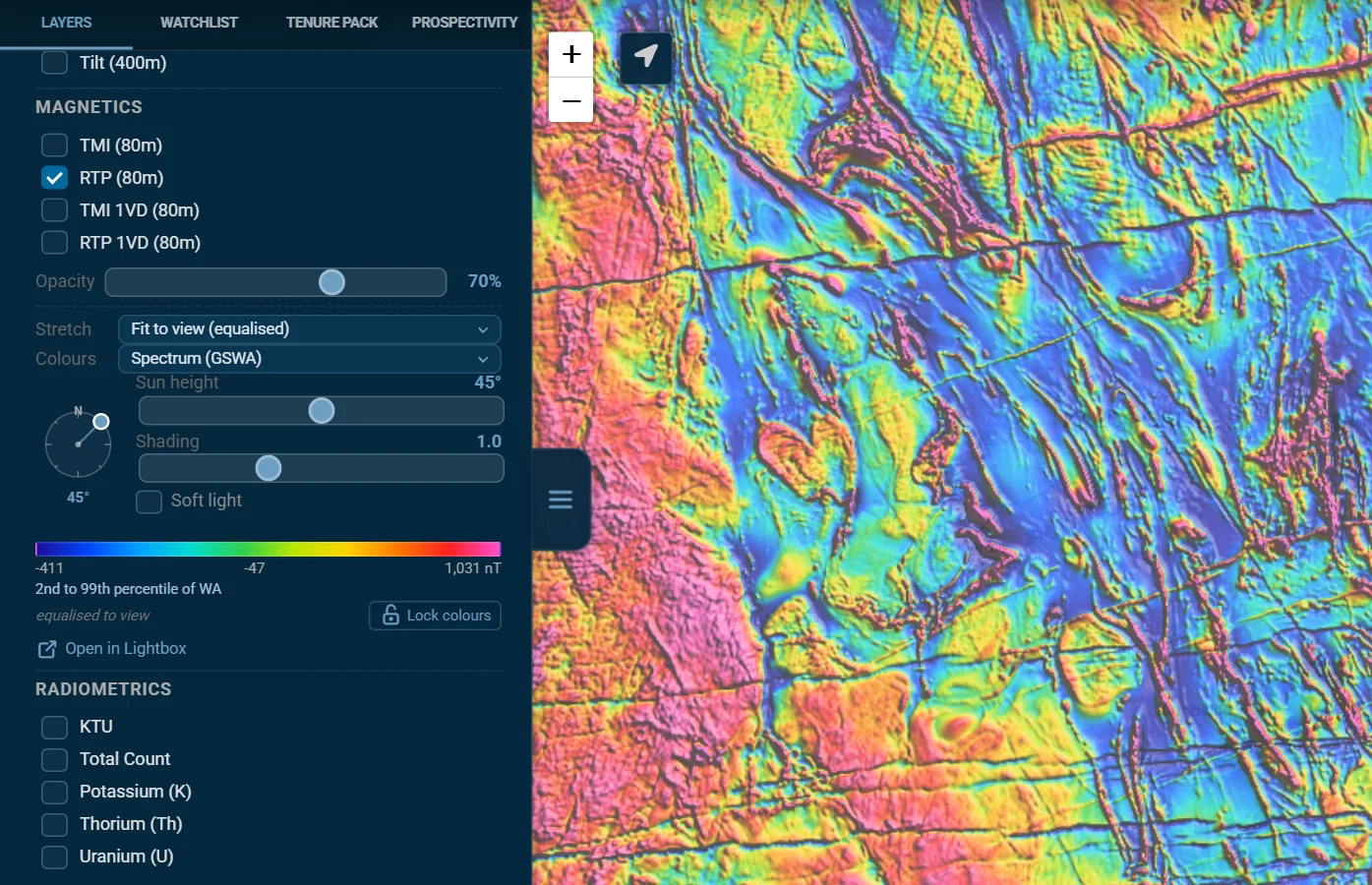
Display controls
Each group has its own controls under its layers, and keeps them as you switch layers: move from TMI to RTP and the sun stays where you put it.
- Stretch: Fit to view (equalised) spreads the colours over the values on screen, and refits as you pan and zoom, so a subtle anomaly in quiet ground gets the full range. Fit to view (linear) does the same with a straight 2 to 98% stretch, and Statewide uses one stretch for all of WA.
- Colours: Spectrum (GSWA), the geophysics convention, or Turbo, Viridis, Magma, Cividis, Thermal, Blue-white-red, Terrain, NextMaps blue and Greyscale.
- The sun: drag the dial to relight the grid. Light across a structure's strike to pick it out; structures that run along the light fade, so sweep the sun round. Sun height low exaggerates subtle gradients; Shading sets the strength (0 is off); Soft light lights from six directions, weighted towards the sun, so every strike shows at once.
- Colour bar: real values along the colours, in the grid's own units (nT, nT/m, %, ppm, nGy/h, µm/s², where 10 µm/s² is 1 mGal, Eötvös or degrees). The lock holds the colours while you pan and zoom, to compare neighbouring ground on one scale. The line under it says where the range sits among all of WA's values, for example 8th to 97th percentile of WA: a narrow band means the colours are exaggerating small differences.
- Fit to: with a tenement selected in the results, or any result with an outline such as a MAGIX survey or a reserve, Fit to followed by its name stretches the colours to the values inside it and holds them like the lock, so a strong body next door no longer flattens the anomalies on that ground. With a mask on (see Mask to tenements), Fit to mask stretches to every title in the mask at once, and follows the mask as you add or remove titles. Unlock to fit the view again.
- Reset to default puts back the stretch, colours and sun; Opacity sits above the controls.
- Values: the status bar shows the value under the pointer. On a touch screen, tap the map to read one.
- Open in Lightbox opens the layer and the area in view in NextMaps Lightbox, the grid viewer, for profiles, swipe comparisons and interpretation lines.
MAGIX surveys and survey grids
MAGIX Survey Areas Free account outlines the airborne and ground geophysical surveys in GSWA's MAGIX catalogue. Click inside one for the survey's name, methods, line spacing, dates and operator, with links to its MAGIX page and its data download.
For a public survey with a GSWA download, the card also offers Add to map Premium, which draws the survey's own grid at its own cell size, usually 10 to 100 m:
- One click draws the survey's TMI if there is one under where you clicked. Otherwise a list shows every grid in the download, with its cell size and file size, to choose from.
- A survey grid takes the same stretch, colours, sun and value readout as the statewide layers. It is listed under Geophysics > Survey grids, with opacity, zoom to and remove.
- While one is on the map, the survey areas draw as outlines only.
- Grids are read from GSWA's download each time and not kept: reloading the map clears them.
- Open in Lightbox on the card sends the grid files to Lightbox instead, which is the way to open a survey's Geosoft or GeoTIFF grids.
Basemaps and relief
Map, in the status bar, chooses the basemap under everything: Light (the default), OSM (OpenStreetMap), Satellite, Sentinel-2 (a cloud-free mosaic) or Topo.
Relief, beside it, lays shaded relief from Geoscience Australia's 1 second SRTM elevation model over any basemap; no account needed. The sun button next to it sets the sun direction (drag the dial), sun height, vertical exaggeration, opacity and soft light, and Colours turns it into a shaded elevation map, coloured over the range in view. With relief on, the status bar shows the elevation under the pointer.
Satellite mineral mapping
ASTER mineral maps Premium
Mineral Maps (ASTER) has CSIRO and Geoscience Australia's ASTER geoscience maps, about 30 m across WA. Content products show how much of a mineral group is present; composition products show which mineral within it.
- Iron oxides & gossan: ferric oxide content, ferric oxide composition (hematite against goethite), ferrous iron index.
- Clay & AlOH alteration: AlOH group content, AlOH group composition (white-mica chemistry), kaolin group index.
- Carbonate & mafic (MgOH): MgOH group content, ferrous iron in MgOH.
- Silica, from thermal infrared: silica index, quartz index.
- Other: opaque index, green vegetation.
Turn on several and set each one's opacity to compare them.
Hyperspectral mineral maps
Mineral Maps (Hyperspectral) has mineral maps NextMaps derives from DLR's EnMAP hyperspectral satellite, about 30 m. They tell mineral species apart where ASTER sees groups. They come from individual scenes rather than a seamless mosaic, so Show coverage (no account needed) outlines where scenes exist.
The products Premium: white mica abundance and composition; kaolin crystallinity; ferric oxide abundance; Fe-OH (gossan and jarosite); chlorite / MgOH and chlorite composition; and two composites, a mineral-index RGB and a PCA composite. EnMAP has no thermal infrared, so silica stays an ASTER job.
Satellite mineral maps are pathfinders for where to look, not a mineralogy you can rely on alone.
Timestamped imagery (Sentinel-2) Pro
Timestamped imagery (Sentinel-2) lays 10 m Copernicus imagery of a date you choose over the area in view. It works best from zoom level 13 in; the zoom button takes you there.
- Layer: natural colour, geology, SWIR, vegetation (false colour), NDVI, moisture, agriculture, atmospheric penetration, urban or bathymetric; or a mineral ratio with vegetation and water masked out: regolith ratio (RGB), ferric iron, gossan, ferric oxides, ferrous iron, or clay and AlOH alteration.
- As of date: the most recent clear imagery on or before this date. Leave it blank for the latest.
- Look-back window, from 14 days to a year, and Cloud: the image is a mosaic of the freshest clear pixels in the window, not a single photo. Widen the window or the cloud limit if it looks patchy.
Under the controls, the map says when the latest pass over the area in view was taken.
Reference layers Free account
The Reference & Administration section: National Roads (highways from zoom level 6, then smaller roads as you zoom in, down to local roads and tracks at 13), Town Points, LGA / Shires, Mineral Fields, and the graticular block grids, Graticular Blocks 5min (from zoom level 11) and 1min (from 13).
My Layers
My Layers, at the top of the Layers tab, holds what is yours.
- Upload Spatial Data Premium: a CSV with coordinates (you choose the columns), GeoJSON, KML, KMZ or a zipped shapefile, up to 25 MB and 50,000 features. Uploads are saved to your account and come back next time you sign in.
- Each layer can be shown or hidden, renamed, recoloured, zoomed to, faded with its slider, or removed. Click a feature for its attributes.
- Interpretations sent from NextMaps Lightbox arrive here too, with their own line styles.
- GPS trails you have saved. See GPS in the field.
- Compliance portfolios Pro: outline the titles in each of your compliance portfolios, coloured by their most urgent deadline: overdue, due within 30 days, to confirm, upcoming, up to date, or application. The compliance manager itself is at nextmaps.com.au/portfolio.
Watchlist Premium
The Watchlist tab follows holders and tenements: it colours their ground on the map and, if you want, emails you when it changes. Switch between Holders and Tenements at the top.
- The list shows the holders, or titles, in view. Type in the search box to find any in WA.
- Tick one to follow it and highlight its ground. The count shows how many are selected; Clear unticks them all.
- Zoom to Selection fits the map to everything ticked, wherever it is.
- Save as Group keeps the selection as a named group, listed under Custom Groups. Each group has its own colour (click the swatch to change it) and buttons to show or hide it, zoom to it, manage it, download its due diligence workbook or delete it. Manage opens the group to add holders: type a listed company there and Add all adds every entity it holds ground through, since its ground is usually held by subsidiaries.
- Due Diligence (XLSX) Pro downloads the register workbook for everything selected. A holder counts as all of its titles across WA.
You can also add to the watchlist from a tenement card (Watchlist), from the star beside a holder's name, from a holder search, and with Watch in the colour-by-owner legend.
Watchlist emails
Turn on Email me when anything here changes, at the top of the tab, and your watchlist is covered by the daily digest, the instant surrender emails and Warden's Court listings. Groups count too, and a group made from a listed company follows any subsidiaries it adds later. It is off until you turn it on: the first time you add to your watchlist, the map asks whether to Email me or Just highlight them. In the bell, these show as alerts From your Watchlist, and you change them here.
Alerts Premium
The bell (Alerts) in the top bar lists your alerts. + Create New Alert sets up a new one:
| Alert type | What it watches |
|---|---|
| Area of Interest (AOI) | Draw an area on the map. Surrenders and withdrawals inside it are sent straight away; new applications, grants, expiries and forfeitures come in the digest, and so do partial surrenders once DMPE maps the new boundary, with how much of the ground given up is inside your area. Transfers are not included. |
| Holder Names | The companies or people you choose, joint holdings included. Their applications, surrenders and withdrawals are sent straight away (new applications within minutes of lodgement); their grants, transfers, expiries and forfeitures come in a daily digest. |
| Specific Tenements | The titles you list: type them, paste a list, or upload a CSV. Surrenders, withdrawals and partial surrenders are sent straight away; grants, transfers, expiries and forfeitures come in a daily digest. |
What alerts cover, at the foot of the bell and at the top of the new-alert form, opens the alerts capability statement: every alert type, how fast each kind of event arrives, and what alerts cannot do.
- Track, for an area: new applications and grants; surrenders, withdrawals, expiries, forfeitures and release dates; or both.
- Warden's Court matters (off unless you tick it): forfeiture applications, plaints and ballots, emailed within about 15 minutes of the cause list being published, usually about six weeks before the hearing.
- Ground going to release, for every alert type: when compulsorily surrendered blocks enter the release pool inside your area, or from a holder's or a listed title, the digest gives the release date and the area. Anyone can apply from that date, not before.
- Exemption from expenditure applications (off unless you tick it): a holder asking to be let off a year's minimum spend, emailed the day DMPE advertises it, with the date objections close.
- Digest frequency, for an area: Daily (5:30 am AWST) or Weekly (Monday 5:30 am AWST). New applications in an area usually reach the digest about two business days after lodgement. Holder and tenement alerts always take the daily digest.
Surrenders and withdrawals are sent the moment they are detected rather than in the digest. DMPE publishes them in one batch at 4:30 pm each business day, and they reach you within about 10 minutes of that. Each email says which stage it is: lodged (for a voluntary surrender or a withdrawal, the ground can be applied for from the lodgement time it gives), processed, or rejected.
With the compliance manager Pro, the bell also links to Compliance: the rent, Form 5 and reporting deadlines on your own titles.
Tenure Packs
A Tenure Pack is a due diligence pack for a tenement or an area, built while you wait (up to a couple of minutes for a large area) and downloaded as one ZIP:
- PDF report: the key findings with risks flagged, maps, and the title at a glance.
- Ground status: the No-Go Zones check over the title or area, with how much of it is closed, closed to exploration licences or restricted, and why.
- Ownership: the ASX-listed company behind each holder, and the ground next door.
- Register: expenditure, rent, dealings and conditions, with a due diligence spreadsheet.
- Exploration record: WAMEX reports, drillholes, the best values on record and the geochemistry.
- Files: Shapefile, GeoJSON, KML and CSV, and a Markdown report to give to AI tools.
To build one, open the Tenure Pack tab (or press Tenure Pack on a tenement card):
- Tenement ID: type one ID, pick it from the suggestions, then Generate Tenure Pack.
- Draw AOI: Start Drawing, draw your area on the map, check the area details, then Generate AOI Tenure Pack. An area can be up to 300 graticular blocks, about 84,000 ha on the south coast to 100,000 ha in the Kimberley.
Your Tenure Packs lists the packs you have made. Downloading one again rebuilds it from the current register, so it is always up to date; a pack made with Pro needs Pro to rebuild. Select several to download them merged, as one set of spatial files, one PDF, or both. See a Sample downloads a real example pack, so you can see what you get first.
Your first pack is free. After that, Tenure Packs are included with Pro, as many as you like while you are subscribed. A title listed on the marketplace is free once you have opened its listing, while the listing is live, and does not use up your free pack.
Prospectivity reports
The Prospectivity tab builds a Prospectivity Data Room for a tenement or an area, from the open-file WAMEX record:
- a prospectivity report, as a PDF and in Markdown;
- an Exploration Data Room of the surface sampling and drilling;
- the WAMEX source archive: the report PDFs and drilling data it was built from.
To request one:
- Choose Tenement ID and type the ID, or Draw AOI and draw an area. An area can hold up to 250 WAMEX reports; the count shows once you have drawn it. An area report can have a name.
- Choose the report type. Survey is a regional scan across all commodities. Focused is a deep dive on the commodities you choose.
- Optionally, open Add your own data or instructions: up to six PDFs or CSVs (15 MB each) about this ground or right next to it, such as reports that are not yet open file, and instructions in your own words, for example Rank tenement priority by element and propose an exploration program. You confirm you have the right to share the files. They are processed by a third-party AI provider under no-training, zero-retention terms, are private to you, and are never shared with other users.
- Press Generate Report.
A tenement report takes 30 to 60 minutes and an area report about an hour. You get an email when it is ready, so there is no need to wait. My Recent Reports lists your reports to download again at any time. See a Sample has a full example to look at first.
Every account gets one free Survey report and one free Focused report. After that, reports are included with Pro, 10 a month, then paid per report.
A report is a first pass over the open-file record. Check anything you act on against the WAMEX reports in its source archive.
Analytics Premium
The Analytics tab on the right edge of the map reads the WA tenement market as a market: what was pegged, dropped and sold, and what the ground on your screen is made of.
- In view or All WA sets what every card covers; In view follows the map as you move it. The period runs from 7 days to 12 months.
- The tiles at the top count live tenements and applications, with the hectares held and pending.
- Market pulse: new, dropped and transferred tenure, week by week.
- Who is moving: the holders gaining and giving up the most ground. Click one to frame their ground on the map.
- Transfers: tenure sold, grouped by deal rather than by title.
- Ground changing hands: new tenure pegged on ground someone else recently gave up.
- Ground in view (or across WA): expiry, expenditure, tenement types, the biggest holders and the busiest shires for whatever is on screen.
- Numbers on each card shows the figures as a table.
Share and export
Share & Export, in the top bar, has two tabs.
Download Map Premium
Makes a print-quality map of what is on screen, A4 at 300 dpi, with your title, a legend, a scale bar, a north arrow, a coordinate grid and the data credits.
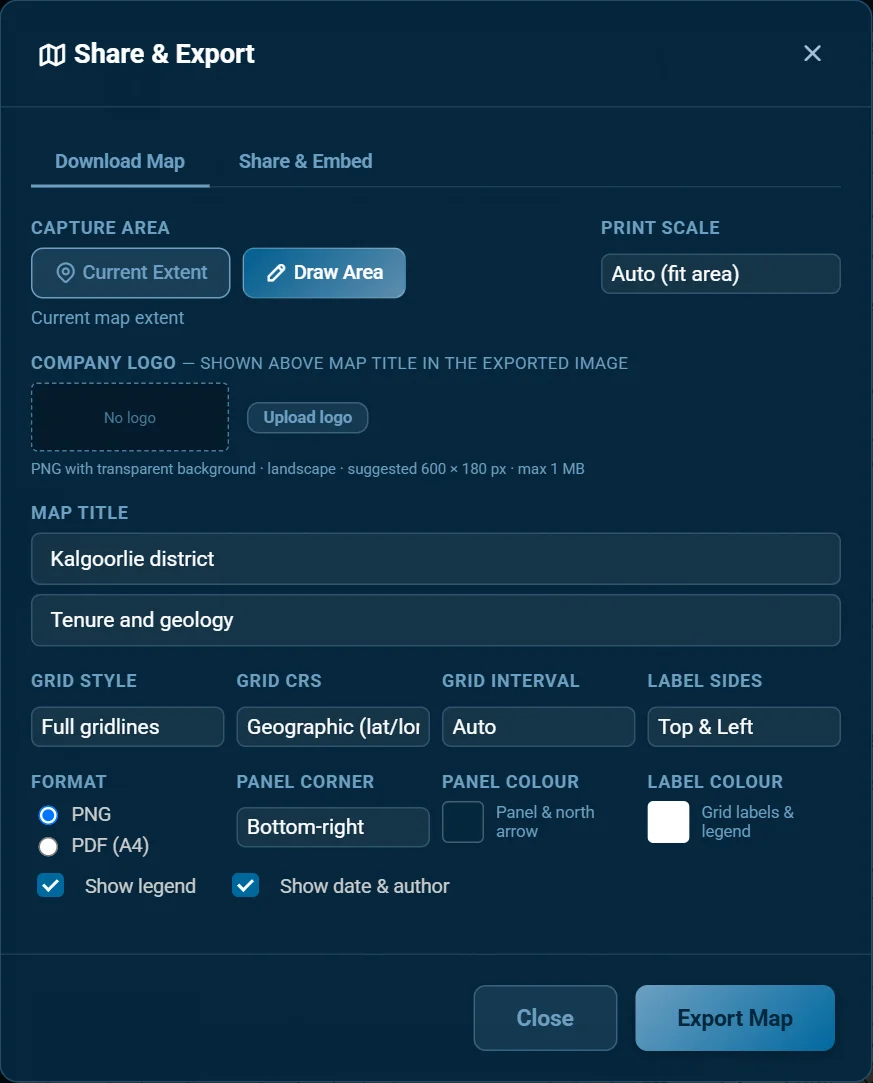
- Capture area: the Current Extent, or Draw Area and drag a rectangle on the map.
- Print scale: Auto fits the area; a scale from 1:5,000 to 1:1,000,000 frames the map around the area's centre at exactly that scale, on an A4 PDF or a PNG printed at 300 dpi.
- Company logo: a PNG with a transparent background, landscape, about 600 × 180 px and no more than 1 MB, shown above the title.
- Map title and an optional subtitle.
- The grid: Grid style (full gridlines, inside or outside ticks, or none), Grid CRS (latitude and longitude, or MGA), Grid interval and Label sides.
- Appearance: Format (PNG or an A4 PDF), the corner and colour of the panel holding the legend and north arrow, the label colour, and whether to show the legend and the date and author.
Press Export Map.
Mask to tenements Free account
For a figure of your ground: select a tenement and press Mask on its card. The raster layers (geophysics, survey grids, Sentinel-2, the ASTER and hyperspectral mineral maps and the geology maps) then show only inside the title, and the map outside it is dimmed. Tenements, points and labels are not masked.
- Select more titles and press Add to mask to build up a package, or press the holder's name on the mask chip at the top left of the map to add every live title they hold. Unmask takes a title back out.
- Dim on the chip sets how dark the outside is (55%, 80% or none); the cross clears the mask.
- Download Map exports the map masked as it is on screen. With a satellite basemap and nothing else on, the dimming alone gives the familiar imagery-over-the-package picture; press Fit colours on the chip to stretch every geophysics layer on the map to the same ground. The colours then follow the mask as titles go in or out, and go back to fitting the view when you clear it.
- The mask is cleared when you reload the map.
Share & Embed Pro
Makes a live map of your project area to share with clients, partners or investors, who need no login to see it. Give it a project title and press Generate: you get a share link to paste anywhere and an embed code for your website, sized by Snippet format (responsive 16:9 or 4:3, or fixed at 400 or 600 px).
Tenements, MINEDEX and mining sites in an embed stay live. Your watchlist highlights and groups, geology and geophysics, uploaded layers under 500 KB, roads and towns are copied when you generate it, so generate it again after you change them. Your embeds lists the ones you have made.
Ask the map Free account
The Ask the map bar at the bottom of the screen takes what you want in plain words, then turns on the layers, sets the filters and moves the map for you, and says what it did. For example:
- Show tenements expiring this year
- Distressed tenements near Kalgoorlie
- Fly to Broome, show native title constraints
- WAMEX reports from the 1980s near Meekatharra
- Geology and magnetics in the Goldfields
It remembers the last few turns, so you can follow up with now only gold; ↺ starts afresh, and the chat button shows the conversation so far. It can only use what your plan includes, and says which plan has anything it could not do. A free account has a daily number of questions, reset each day; Premium removes the limit.
GPS in the field
On a phone or tablet in the field, the map can show where you are and record where you have been.
- Show my location, the arrow button beside the zoom buttons, puts your position on the map (your browser asks for permission the first time). While it is on, the status bar shows the tenement you are standing on, and a message tells you when you leave one.
- Record trail, beside it on a phone or tablet, records your track (on a computer these buttons stay hidden). While you record, Drop a waypoint here marks a point along the way, noting the tenement it is on, and My saved trails lists the trails you have kept.
- The trail is kept in your browser until you save, download or discard it, so a lost signal, a reload or a closed tab does not lose it. A gap (screen locked, signal lost) starts a new segment rather than drawing a line you never walked, and standing still adds no distance.
- Save to my account Free account keeps the trail under My Layers > GPS trails. A trail downloads as GPX, KML or GeoJSON.
Measuring and scale
- Measure, in the status bar: click points along a line and the running distance shows as you go. Double-click, Stop or Esc ends the measurement and clears the line, so read the distance first.
- The scale box at the bottom left shows the map's scale on screen, which is approximate since screens differ. Click it and pick a scale, from 1:5,000 to 1:5,000,000, to zoom to it. For an exact printed scale, use Print scale in Download Map.
- Graticular block grids, for counting blocks, are under Reference layers.
The marketplace
The NextMaps marketplace lists WA tenements for sale, joint venture or farm-in. The Marketplace card at the top of the Layers tab opens it (Browse), puts listings on the map (Show on map Free account) or starts a listing of your own (List).
Finding ground
- The panel's tabs: Browse, Saved (listings you have starred), My Listings and Contacted.
- Sort by newest, enquiries or views. Filters narrow listings by status (for sale, under offer, sold, withdrawn, expired), price, tenement type and status, project stage, resource compliance (JORC, NI 43-101), transaction type and commodity; Reset clears them.
- Open a listing for its description, pictures, tenements and documents. Share gives you a link to its public page (on a phone, through the phone's share menu). Some sellers ask you to sign an NDA before you download their documents; the description and pictures never need one.
- Under the description, NextMaps due diligence Free account shows what public records say about the ground: WAMEX reports over it, open-file drillholes and metres drilled, earlier titles on it, native title and conservation land. Below that is a Tenure Pack button for each title, free while the listing is live (see Tenure Packs). Where the seller added one, there is also an AI prospectivity report: its verdict, an opening summary, Read the report for the PDF and Data room (XLSX) for the data behind it. The seller chose to include it but cannot edit it.
- Contacting a seller is free. Signed in, you send an introduction message through NextMaps (at least 100 characters: who you are and why this ground), the seller gets it by email, and their contact details are shown to you.
Listing your ground
Listing is free Free account. If a buyer introduced through NextMaps completes a purchase, a facilitation fee on a sliding scale applies; the form sets it out, and you review the full agreement before you submit. To list:
- Press List, or List it under a tenement card, and find your tenements. A listing can hold several, of any type.
- Give it a project title, price, stage, a description (at least 300 characters), a public teaser (50 to 400 characters, shown on Google and the public marketplace page), the transaction types you would consider, its JORC or NI 43-101 status and its commodities.
- Under Buyer due diligence, decide whether to tick Add an AI prospectivity report for buyers. Once the listing is approved, NextMaps writes the report from open-file data for up to two of your commodities, emails you a copy when it is ready, and shows it to signed-in buyers on your listing as written. Untick the box when you edit the listing to take it off. Every listing gets a free Tenure Pack for each title either way.
- Add contact details, up to five pictures and up to five documents. You can require buyers to sign an NDA before they download the documents.
- Optionally, upload a document that proves you hold the title (a transfer notification, a rent receipt, an acknowledgement of application or a notice of grant) for a Verified Owner badge. It is only used for the check: buyers never see it.
A new listing is reviewed before it goes live, and you get an email when it has been. Changes to a live listing are reviewed too; buyers see it as it was until they are approved. Keep contact details out of the listing, pictures and documents: buyers reach you through the introduction.
Not sure who would buy your ground? See who would buy it, under a tenement card or in the marketplace panel, asks NextMaps for a divestment review.
Links that open the map
These links open the map on something in particular. The public tenement and explorer pages use them, and you can put them in your own notes and documents.
| Link | Opens |
|---|---|
/map?tenement=E%2070/1234 | The map on that tenement, listed in Results. Add ®ister=1 to open its register too, &pack=1 for the Tenure Pack form or &report=1 for the prospectivity report form. |
/map?holder=NAME | A search for that holder, with the map fitted to their ground. Add &group=1 for a listed company to select every entity it holds ground through. |
/map?fit=W,S,E,N | The map fitted to a box, given as longitudes and latitudes: west, south, east, north. |
On a phone or tablet
The map works on touch screens, with a layout of its own on a phone:
- The sidebar starts closed and opens over the map with the three-line button.
- Tap a tenement and its card shows over the map. Its Tenure Pack and Prospectivity buttons open the sidebar on that tab.
- In the sidebar, Results shrinks to its header while you use a tab, and comes back with your next tap on the map. Its minimise button does the same.
- The status bar, the Ask bar, and the scale and legend stack along the bottom.
- Tap a geophysics layer or the relief to read its value.
- For field use, see GPS in the field.
The full set of panels has the most room on a laptop or desktop.
Where the data comes from
| Data | Source | How fresh |
|---|---|---|
| Tenements and applications | DMPE's tenement data, and DMPE's EMITS notices feed for surrenders, withdrawals and new applications | Rebuilt every night; the notices feed is checked every 10 minutes |
| Register details, Tenement Intelligence, the timeline | DMPE's EMITS register | Synced every night; the timeline adds today's notices |
| WAMEX reports | DMPE's WAMEX | Synced every night |
| WAMEX surface and drillhole geochemistry | DMPE's geochemistry releases of company assays | Updated with each release, about every six months |
| Geology, open-file drillhole collars, land access, environment, heritage | DMPE, GSWA, DPLH, DBCA and the NNTT, through the WA government's SLIP services | Live from the source |
| GSWA geochemistry, drilling density | GSWA and DMPE, through SLIP | Copied every week (GSWA adds samples rarely); the geochemistry comes straight from SLIP if a week's copy is missing |
| Historical tenement plans, Hallberg map sheet outlines, 2020 regolith, regolith regimes, WAROX, WMC geochemistry | GSWA and DMPE, through GeoVIEW.WA | Copied every week |
| GSWA gridded maxima | GSWA, through GeoVIEW.WA (the drillhole grids from the November 2022 open-file geochemistry) | Copied every month |
| MINEDEX (and the operating mines and major project stages taken from it) | DMPE, through SLIP | Copied every night, so it loads in about a second; straight from SLIP if a night's copy is missing |
| Major projects, abandoned mines, mining residue, graticular blocks | DMPE | Copies, refreshed from time to time; a layer's tooltip gives its date where it has one (major project stages are live from MINEDEX) |
| Magnetics, radiometrics, gravity | GSWA statewide grids (the gravity residual uses Geoscience Australia's isostatic corrections) | As GSWA releases them |
| Shaded relief | Geoscience Australia, 1 second SRTM DEM-S | Fixed |
| ASTER mineral maps | CSIRO and Geoscience Australia | Fixed archive |
| Hyperspectral mineral maps | DLR's EnMAP, processed by NextMaps | Added as scenes are processed |
| Sentinel-2 imagery | Copernicus | Each satellite pass |
| Roads, towns, shires | Geoscape, through the Digital Atlas of Australia; ABS | Monthly to yearly |
Each source is credited on the map and in exported maps.
Terms used
| Term | Meaning |
|---|---|
| A-number | The number DMPE gives each WAMEX report: an A followed by digits. |
| Application | A title applied for and not yet granted (status pending). The map draws applications in blue. |
| AOI | Area of interest: an area you draw on the map for an alert, a Tenure Pack or a report. |
| Combined reporting | An arrangement that lets a holder report exploration spend across a group of titles as one. |
| DMPE | The Department of Mines, Petroleum and Exploration, which administers mining titles in WA. |
| DPLH, DBCA | The Department of Planning, Lands and Heritage, and the Department of Biodiversity, Conservation and Attractions. |
| EMITS | DMPE's online mining tenement system: the register and the notices the map reads come from it. |
| Encumbrance | A registered interest against a title, such as a mortgage or a caveat. |
| Exemption | Relief from a year's minimum exploration spend, which a holder applies for. |
| Forfeiture | Loss of a title for breaching its conditions, such as unpaid rent or spend not met. |
| Form 5 | The annual report of exploration spend lodged for each title. |
| Graticular block | The unit WA titles are measured in: one minute of latitude by one minute of longitude, about 280 to 330 ha, smaller further south. |
| GSWA | The Geological Survey of Western Australia, part of DMPE. |
| MAGIX | GSWA's catalogue of geophysical surveys and their data. |
| MINEDEX | DMPE's database of mines, mineral deposits and prospects. |
| MTO | Mineral Titles Online: DMPE's public site for titles and their records. |
| NNTT, ILUA | The National Native Title Tribunal, and an Indigenous Land Use Agreement. |
| Section 65 | The Mining Act section that makes an exploration licence give up part of its blocks after a set number of years. The released blocks open for application on a set date. |
| SLIP | The WA government's Shared Location Information Platform, which serves much of the map's government data. |
| TMI, RTP, 1VD, tilt | Total magnetic intensity; TMI reduced to the pole, so anomalies sit over their sources; the first vertical derivative, which sharpens shallow sources and edges; and the tilt angle, near zero at the edges of sources. |
| KTU | A radiometric image with potassium in red, thorium in green and uranium in blue. |
| Bouguer, isostatic residual | Gravity corrected for height and for the rock between each station and sea level; and the same with the deep crust and mantle signal taken out. |
| Warden's Court | The court that hears WA mining matters, such as forfeiture applications, plaints, objections and ballots. |
| WAMEX | DMPE's archive of company mineral exploration reports, open to the public once their confidential period ends. |
Keyboard shortcuts
| Keys | Action |
|---|---|
| Alt + T | Tenements on and off |
| Alt + M | MINEDEX on and off |
| Alt + D | Open-file drillholes on and off |
| Alt + S | Statistics: counts of the features loaded |
| Left and right (or up and down) arrows | Previous and next result |
| Esc | Clear results and highlights, stop measuring, or close the register |
| Enter | Search, or pick the highlighted suggestion |
Help, in the status bar, lists these with the support address and the disclaimer.
Troubleshooting
A layer is dimmed and will not tick. It needs a free account or a plan you do not have yet: ★ marks Premium and ◆ Pro on the section header. Click the layer and the map says which.
A layer is ticked but nothing shows. Zoom in: large datasets draw only from a set zoom level, and a zoom button beside the layer takes you there. Some layers cover only part of WA, such as the 100k structures and interpreted bedrock and the hyperspectral scenes.
The tenements disappeared. Check Tenements is still ticked: turning on a Tenement Intelligence layer turns it off. If a layer goes blank after a dropped connection, it retries on its own; reload the page if it has not come back within a minute.
A title surrendered today is still on the map. DMPE publishes surrenders and withdrawals in one batch at 4:30 pm each business day, and the map takes them off once they appear.
A new application is not on the map yet. It appears once DMPE's data includes its boundary, usually within a business day or two of lodgement. A holder alert tells you about it sooner.
Search did not find it. Check what the type button says, or pick the type yourself; sample and drillhole IDs need their type chosen.
My uploaded layers did not come back. Sign in with the account you uploaded them with.
The geophysics colours look flat or washed out. Set Stretch to Fit to view, or unlock the colour bar if you locked it somewhere else.
I am not getting watchlist emails. Check Email me when anything here changes is on at the top of the Watchlist tab, and look for the alerts in the bell.
Something else? Email [email protected] and tell us what you were doing and what you saw.
NextMaps. Updated 28 October 2026. Open the map · Plans and pricing · [email protected]